
Amazon is the world’s largest marketplace and go-to platform for every e-commerce vendor, especially in the US.
That’s why scraping Amazon can provide invaluable data, and it’s the same reason why scraping it is so difficult…
… but not impossible.
In this guide, we’ll scrape simple product pages, product pages with multiple options and numerous variants, and all seller offers from Amazon; unlocking access to millions of Amazon products.
Does Amazon Allow Scraping?
Yes, scraping Amazon is possible and legal as long as you follow the guidelines and stay away from any login-protected personal information.
By respecting these rules and ethical scraping practices, you can gather publicly available data without crossing any laws or regulations. However, if you go into detail, it’s not that simple.
Amazon’s Web Scraping Policy
Amazon’s official Conditions of Use explicitly prohibit “the use of any robot, spider, scraper, or other automated means to access Amazon Services for any purpose.”
This applies to their Terms of Service, robots.txt, and every other policy document they publish. Amazon has a legal team that actively pursues scrapers, and they won’t hesitate to send cease-and-desist letters or take legal action if they catch you scraping at scale.
But here’s the nuance: just visiting a website doesn’t mean you’ve agreed to their terms. You didn’t sign anything. You didn’t click “I agree.” Courts in multiple jurisdictions have recognized this distinction.
Legal Considerations
Scraping publicly available data has been recognized as legal by courts around the world. The landmark hiQ Labs v. LinkedIn case in the US established that scraping public data doesn’t violate the Computer Fraud and Abuse Act. Similar rulings exist in the EU and other jurisdictions.
The key distinction is public vs. private data:
- Public data (product pages, prices, search results) = generally legal to scrape
- Private data (behind login walls, personal information) = off-limits
Amazon’s robots.txt outlines which parts of the site are accessible to automated tools. When scraping Amazon:
- Avoid login-protected content like extended customer reviews—these require authentication and are explicitly restricted
- Stick to publicly accessible pages like product listings, prices, and search results
Amazon recently moved extended customer reviews behind login walls. This actually clarifies the boundary: if it requires a login, don’t scrape it.
Ethical Guidelines
Scraping ethically means balancing your goals with respect for the website’s integrity and policies. Ethical scraping doesn’t just help you avoid potential legal pitfalls; it also fosters a responsible approach to data collection.
Here are a few best practices:
- Respect Rate Limits: Sending too many requests in a short period can overwhelm Amazon’s servers. Use delays or throttling to mimic real user behavior.
- Stick to Publicly Available Data: Avoid scraping content that requires login credentials or is marked as off-limits in the robots.txt file.
- Use Data Responsibly: Whether for analysis or application development, ensure that the data you collect is used in ways that align with Amazon’s guidelines.
Bypass Amazon AWS WAF
Amazon uses its in-house solution, AWS WAF, to protect the platform from bots and scrapers.
Any request you send, whether it’s through your Chrome browser or using Python Requests, your IP, headers, and recent activity is analyzed to make sure you’re human.
So, how do you make your bot bypass it?
Here are your options:
- Manual methods/in-house solutions: Create and maintain a pool of premium proxies and headers to make sure your requests are not flagged.
- Open-source stealth plugins: Pick from countless options such as scrapy-fake-useragent + scrapy-rotating-proxies, camoufox + cheap rotating proxies, rebrowser-puppeteer to go through AWS WAF. These would run locally and cause performance and success rate issues as you scaled, though.
- (Method we will use in this guide) Web scraping APIs: A web scraping API known to handle Amazon persistently such as WebParsers will handle proxies, headers, and CAPTCHAs for you.
Amazon is not impossible to break for a few scraping requests. But if you’re planning on extracting data from millions of products, you need to think about scalability, as re-using proxies and headers will only get you so far.
Prerequisites
Before we start scraping Amazon, let’s set up our environment with the necessary tools.
Install Required Libraries
We’ll use two Python libraries for this tutorial:
- Requests: A simple HTTP library that lets us send requests to web servers and receive responses. It handles all the complexities of making HTTP calls behind the scenes.
- BeautifulSoup: A powerful HTML parsing library that makes it easy to extract data from web pages by navigating the document structure.
Install both with a single command:
pip install requests beautifulsoup4
Grab a Free WebParsers Token
To bypass Amazon’s WAF (Web Application Firewall), we’ll route our requests through WebParsers.
Can you scrape Amazon without WebParsers? Yes, but it would require significant effort to build a browser-like scraper that won’t get caught by Amazon’s anti-bot systems. All the parsing code in this guide would still work—the difference is only in how you fetch the pages.
Here’s why WebParsers makes Amazon scraping easier:
- Automatic WAF bypass: No need to manage headers, cookies, or browser fingerprints
- Proxy rotation: Requests are routed through millions of IPs to avoid rate limiting
- CAPTCHA handling: CAPTCHAs are solved automatically when they appear
For even simpler integration, check out WebParsers’ Amazon Scraper API which returns structured JSON data with ZIP Code based geotargeting and language parameters—no parsing required.
Sign up at WebParsers to get your free API token, then you’re ready to start.
Scraping Product Data from Amazon (Basic)
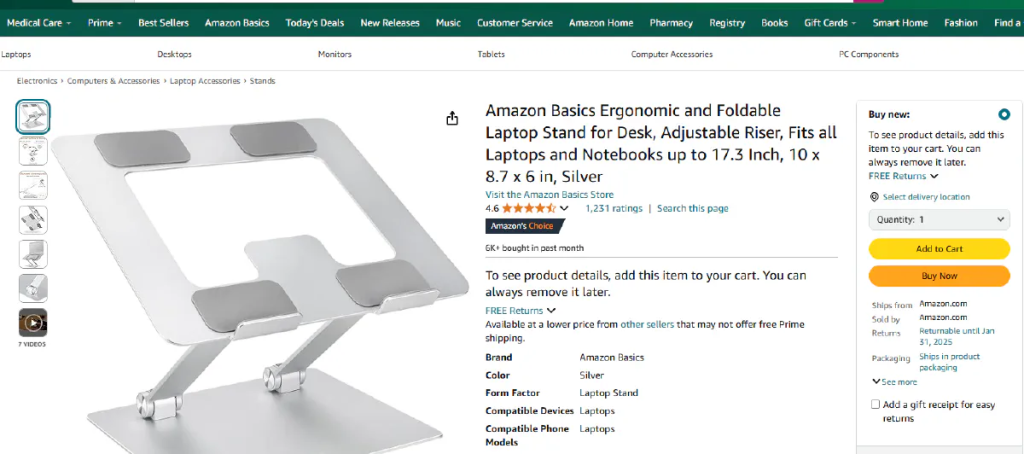
Extracting information from an Amazon product page will be our starting point for this tutorial.
From product prices and images to descriptions and ratings, these pages contain data that can be invaluable for market analysis or application development.
Getting 200 OK from Amazon
We’ll focus on getting a successful HTTP response from the Amazon servers. By routing our request through WebParsers’ API, we can effortlessly skip Amazon’s WAF protection.
This step would normally be quite complex due to Amazon’s advanced protection systems, but with WebParsers we don’t need to handle any bypass mechanisms!
After defining our token and the product URL, we can send our first request:
import requests

url = "https://api-marketplace.webparsers.com/amazon/product?asin=B0BLRJ4R8F&domain=comn"

payload={}
headers = {
   'x-api-key': '<api-key>'
}

response = requests.request("GET", url, headers=headers, data=payload)

print(response.text)
At this point we should be getting an HTTP response stored in our response variable, and if we print it into our console it should look like this:
<Response [200]>
HTTP response with the 200 code means our request is successful.
We can access the contents of the response by using:
response.text
This will include all of the HTML contents of the page including any scripts that are available.
How to Scrape Amazon Product Prices
Price is the most important information about a product, so it will be a nice starting target for us.
For this step, we will start using BeautifulSoup because it helps us parse the data we need.
Before starting the extraction process, we need to locate the information inside the product page we just downloaded. We can either use the response.text that we downloaded in the previous step or go into the product page and use developer tools to inspect the elements.
You can use F12 to access the developer tools on Google Chrome and press ctrl + shift + c to inspect the element you want.
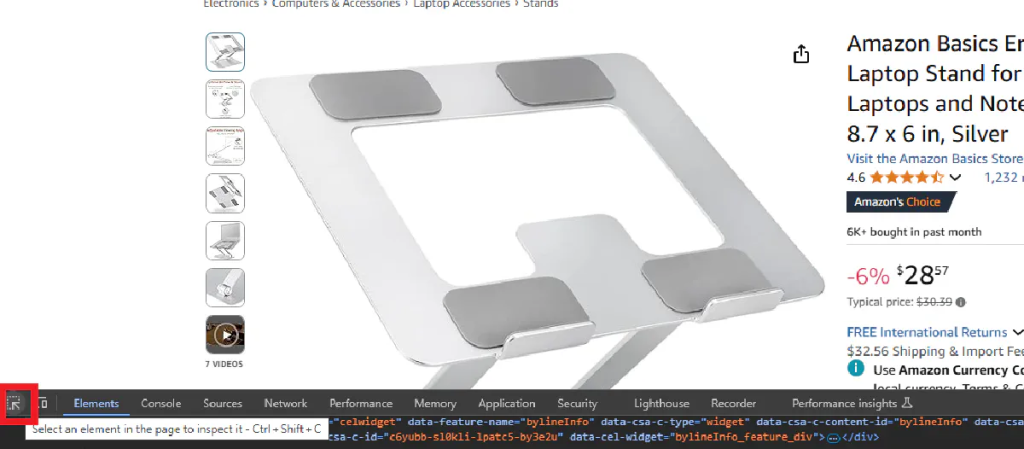
We will use BeautifulSoup to extract price details from both the whole and fraction sections and then put them together:
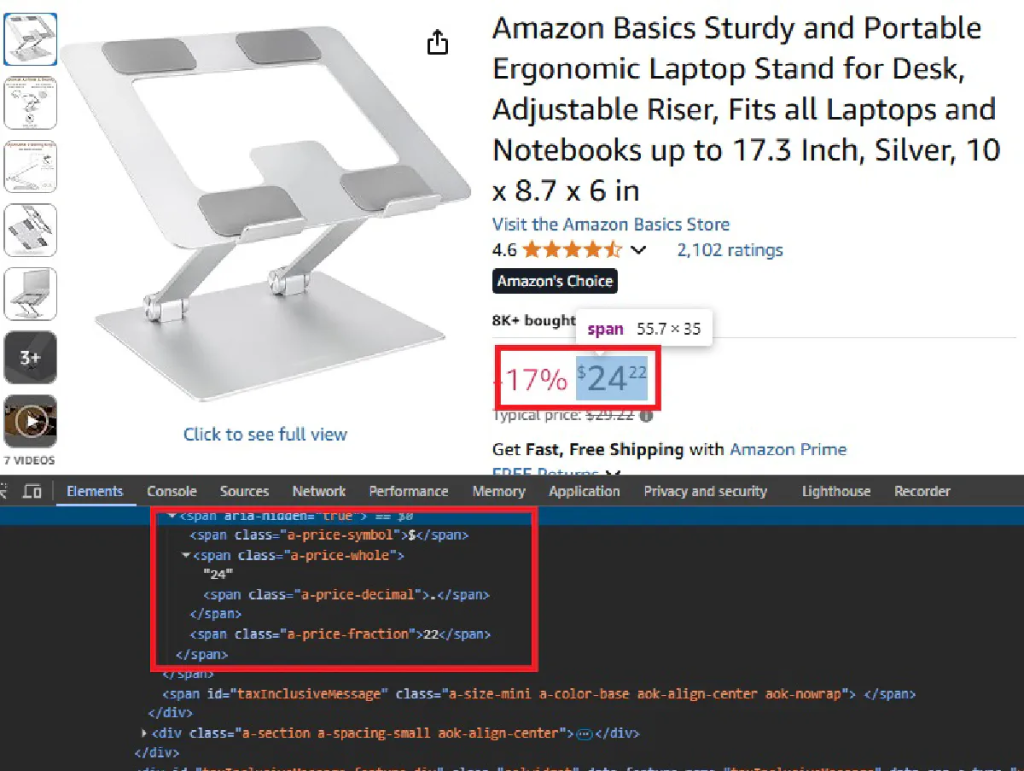
Note: Amazon uses different price structures depending on product availability. We need to handle both regular pricing and out-of-stock scenarios, so we’ll first see if the item is out of stock and scrape the price only if it isn’t.
from bs4 import BeautifulSoup

# Parse the request using BS
soup = BeautifulSoup(response.text, "html.parser")

# Extract price with out-of-stock handling
if soup.find("div", id="outOfStockBuyBox_feature_div"):
    price = "Out of Stock"
else:
    whole = soup.find(class_="a-price-whole")
    fraction = soup.find(class_="a-price-fraction")
    price = f"${whole.text}{fraction.text}"

print("Price:", price)
After running this script, we should be getting the product price printed on our console, whether it’s available or out of stock.
Price: $28.57 or Price: Out of Stock
Scrape Other Product Details
The following steps will be pretty similar to getting the price information.
We will inspect each piece of information that we are interested in using the developer tools and try to find an encapsulating HTML object that holds the complete information.
Product Name
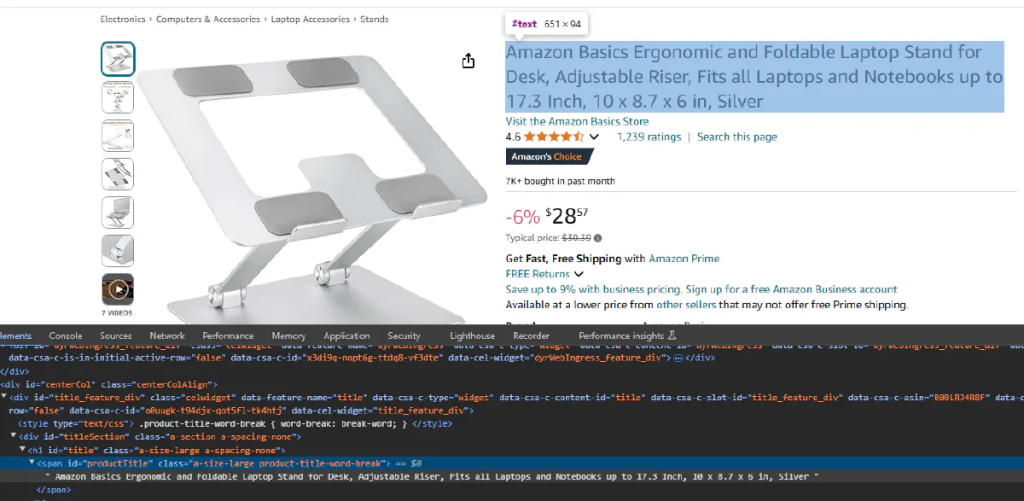
We can see that the product name is stored inside a span object with the id productTitle. Again, we will access this object with BeautifulSoup and print the information inside of it.
name = soup.find(id="productTitle").text.strip()
print("Product Name:", name)
We should be getting the product name printed on our console:
Product Name: Amazon Basics Ergonomic and Foldable Laptop Stand for Desk, Adjustable Riser, Fits all Laptops and Notebooks up to 17.3 Inch, 10 x 8.7 x 6 in, Silver
Product Image
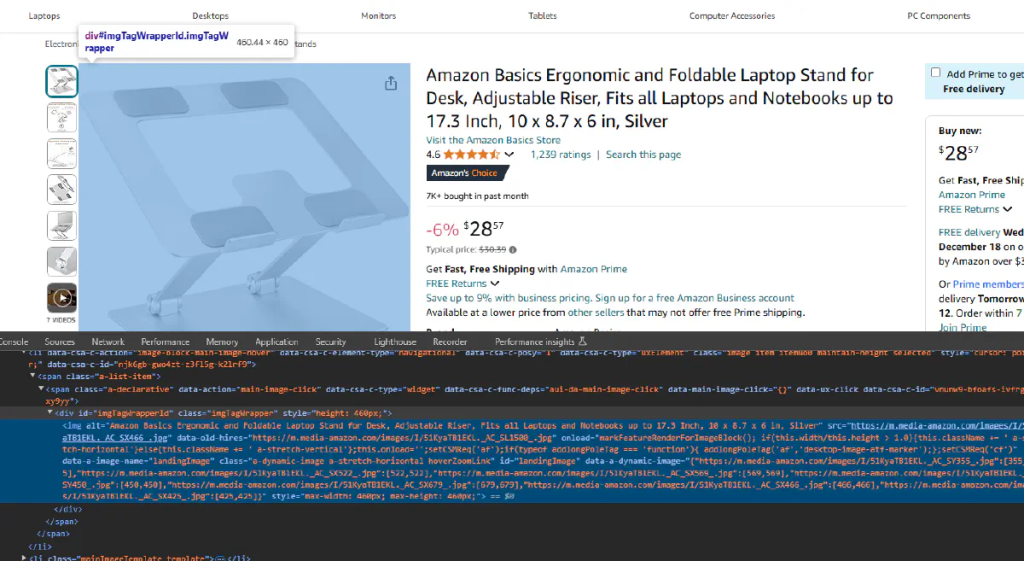
For the product image, we will start with inspecting the element again and find the HTML object containing the product image.
landingImage is the id of the element that contains the image.
But this time we are interested in the src attribute of the object instead of the text, since the image URL is stored in this attribute:
image = soup.find("img", {"id": "landingImage"})["src"]
print("Image URL:", image)
We should be getting the image URL printed on our console:
Image URL: https://m.media-amazon.com/images/I/51KyaTB1EKL.__AC_SX300_SY300_QL70_FMwebp_.jpg
Product ASIN
The ASIN (Amazon Standard Identification Number) is a unique identifier for each product. We can extract this directly from the URL, which is useful for database storage and referencing.
# Extract ASIN from URL
asin = targetUrl.split("/dp/")[1].split("/")[0].split("?")[0]
print("ASIN:", asin)
This will give us:
ASIN: B0BLRJ4R8F
Product Rating
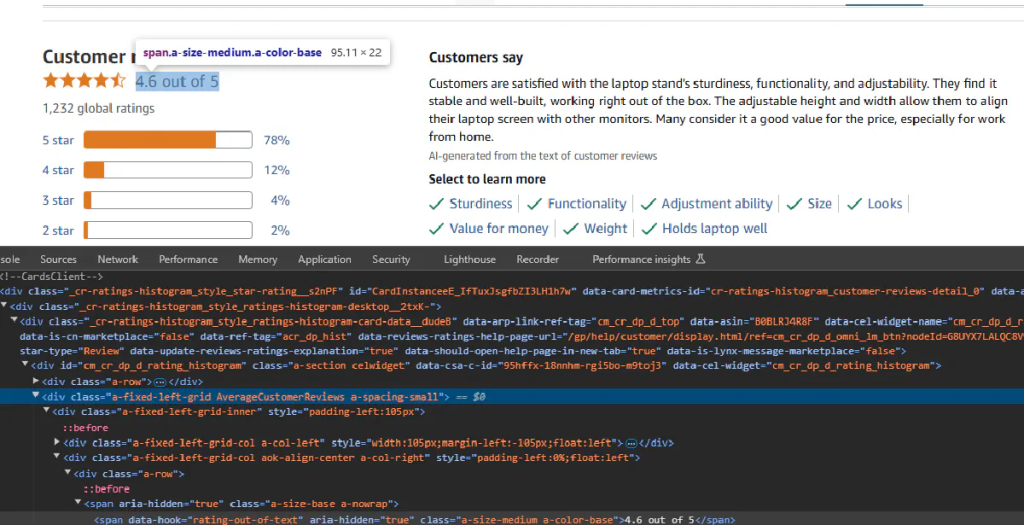
For the product rating, we will try to get the information and strip the part we are interested in:
rating = soup.find(class_="AverageCustomerReviews").text.strip().split(" out of")[0]
print("Rating:", rating)
Now we get this:
Rating: 4.6
Export to CSV
To make your scraped data actionable and be able to easily scale this up to a thousand products, it’s essential to save it in a structured data format.
So we will export it into CSV which is the most basic format.
Let’s also use two additional products to make our code loop through URLs. Here’s the final code:
import requests
import urllib.parse
from bs4 import BeautifulSoup

# Our token provided by WebParsers
token = "<your-token>"

# Amazon product urls
targetUrls = ["https://www.amazon.com/Amazon-Basics-Portable-Adjustable-Notebook/dp/B0BLRJ4R8F/",
              "https://www.amazon.com/Urmust-Ergonomic-Adjustable-Ultrabook-Compatible/dp/B081YXWDTQ/",
              "https://www.amazon.com/Ergonomic-Compatible-Notebook-Soundance-LS1/dp/B07D74DT3B/"]

for targetUrl in targetUrls:
    # Use Amazon Scraper API with geo-targeting
    apiUrl = f"https://api.webparsers.com/plugin/amazon/?token={token}&url={urllib.parse.quote(targetUrl, safe='')}&geocode=us&zipcode=10001&output=html"
    response = requests.get(apiUrl)

    # Parse the request using BS
    soup = BeautifulSoup(response.text, "html.parser")

    name = soup.find(id="productTitle").text.strip()

    # Extract ASIN from URL
    asin = targetUrl.split("/dp/")[1].split("/")[0].split("?")[0]

    # Extract price
    if soup.find("div", id="outOfStockBuyBox_feature_div"):
        price = "Out of Stock"
    else:
        whole = soup.find(class_="a-price-whole")
        fraction = soup.find(class_="a-price-fraction")
        price = f"${whole.text}{fraction.text}"

    image = soup.find("img", {"id": "landingImage"})["src"]
    rating = soup.find(class_="AverageCustomerReviews").text.strip().split(" out of")[0]
    with open("output.csv", "a") as f:
        f.write('"' + asin + '", "' + name + '", "' + price + '", "' + image + '","' + rating + '" \n')
And voila, information about these 3 products should be saved into our CSV file.
One API Call, More Data
If you’d rather skip the HTML parsing entirely, WebParsers’ Amazon Scraper API has a dedicated PDP (Product Detail Page) endpoint that returns structured JSON.
One request, all the data:
import requests

token = "<your-token>"
asin = "B0BLRJ4R8F"

response = requests.get(
    "https://api.webparsers.com/plugin/amazon/pdp",
    params={
        "token": token,
        "asin": asin,
        "geocode": "us",
        "zipcode": "10001"
    }
)

data = response.json()
print(data)
Sample response:
{
  "asin": "B0BLRJ4R8F",
  "name": "Amazon Basics Ergonomic Laptop Stand...",
  "brand": "Amazon Basics",
  "price": 28.57,
  "currency": "USD",
  "rating": 4.6,
  "total_ratings": 12847,
  "is_prime": true,
  "thumbnail": "https://m.media-amazon.com/images/I/...",
  "images": [...],
  "best_seller_rankings": [...],
  "technical_details": {...},
  "status": "success"
}
No parsing required—just pass the ASIN and get back clean, structured product data with pricing, ratings, images, and technical specs.
Scrape All Color, Size, Model Variations of an Amazon Product (Advanced)
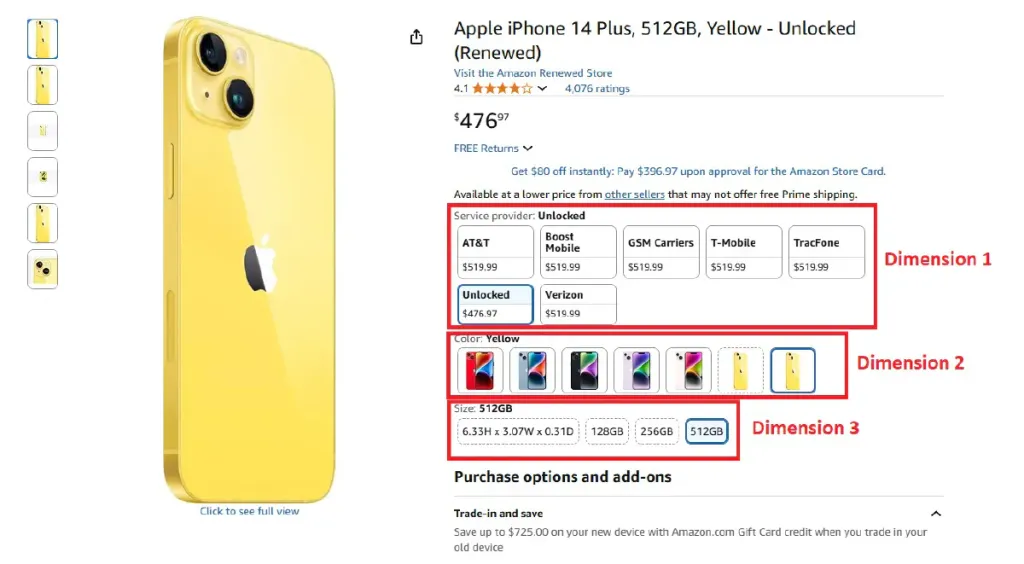
Many Amazon products don’t have a single, static price.
The price changes with the option you choose: color, size, style, model, and more.
If you only scrape the default page, you’ll miss most of the catalog, so the right way is to discover every available variation and visit each variation’s dedicated URL to read its own price and selected options.
What we’re building below is a reliable system that:
- Finds all variation dimensions on the base product page (color, size, style, etc.)
- Walks through every valid option combination without duplication
- Reads the selected options on each visited page and grabs prices and product names
- Writes everything into a clean CSV
Extract All Available Variations
We’ll begin by grabbing the base product page and mapping out the full set of variation dimensions and their options.
First, we build the API request through WebParsers:
import requests
import urllib.parse
import csv
from bs4 import BeautifulSoup
import re

# WebParsers token and target URL
token = "<your-token>"
PRODUCT_URL = "https://www.amazon.com/Apple-iPhone-Plus-128GB-Blue/dp/B0CG84XR6N/"

# Initial page scrape to find dimensions
api_url = f"https://api.webparsers.com/plugin/amazon/?token={token}&url={urllib.parse.quote(PRODUCT_URL, safe='')}&geocode=us&zipcode=10001&output=html"
soup = BeautifulSoup(requests.get(api_url).text, "html.parser")
WebParsers returns the fully-rendered HTML and handles the heavy lifting (WAFs, geo, headers).
Then, we’ll reuse the exact same product name and price logic from the previous section:
name = soup.find(id="productTitle").text.strip()
price = "Out of Stock" if soup.find("div", id="outOfStockBuyBox_feature_div") else f"${soup.find(class_='a-price-whole').text}{soup.find(class_='a-price-fraction').text}"
Then, we’ll extract all dimension and option names from the select menus:
# Extract available dimensions and options
dimensions = {}
for row in soup.find_all("div", {"id": re.compile(r"inline-twister-row-.*")}):
    dim_name = row.get("id", "").replace("inline-twister-row-", "").replace("_name", "")
    options = []
    for option in row.find_all("li", {"data-asin": True}):
        asin = option.get("data-asin")
        if asin and option.get("data-initiallyUnavailable") != "true":
            swatch = option.find("span", {"class": "swatch-title-text-display"})
            img = option.find("img")
            button = option.find("span", {"class": "a-button-text"})

            option_name = swatch.text.strip() if swatch else img.get("alt", "").strip() if img and img.get("alt") else button.get_text(strip=True) if button and button.get_text(strip=True) != "Select" else "Unknown"
            options.append({"name": option_name, "asin": asin})

    if options:
        dimensions[dim_name] = options

print(f"Found dimensions: {list(dimensions.keys())}")
for dim_name, options in dimensions.items():
    print(f"  {dim_name}: {len(options)} options")
We then also set up a sensible traversal order and CSV headers:
# Setup dimension traversal order and CSV headers
priority = ['color', 'size', 'style', 'pattern', 'material', 'fit']
dim_names = sorted(dimensions.keys(), key=lambda x: priority.index(x.lower()) if x.lower() in priority else len(priority))
headers = ["ASIN", "Product Name"] + dim_names + ["Price"]
results = []
scraped = set()
Scrape All Product Variations One by One
Next, we’ll recursively walk through the option tree.
For each option, we load its dedicated product page (using the option’s ASIN) and capture both the selected options and the correct price.
# Recursive function to scrape all product variations
def scrape_variations(asin, dim_index=0, prefix=""):
    if asin in scraped:
        return

    url = f"{PRODUCT_URL.split('/dp/')[0]}/dp/{asin}/?th=1&psc=1"
    api_url = f"https://api.webparsers.com/plugin/amazon/?token={token}&url={urllib.parse.quote(url, safe='')}&geocode=us&zipcode=10001&output=html"
    soup = BeautifulSoup(requests.get(api_url).text, "html.parser")

    name = soup.find(id="productTitle").text.strip()
    price = "Out of Stock" if soup.find("div", id="outOfStockBuyBox_feature_div") else f"${soup.find(class_='a-price-whole').text}{soup.find(class_='a-price-fraction').text}"

    # ... continue with parsing logic
When you run the complete code, it’ll start printing progress on the terminal:
Found dimensions: ['service_provider', 'color', 'size']
  service_provider: 7 options
  color: 7 options
  size: 4 options

Dimension traversal order: ['color', 'size', 'service_provider']

Starting variation crawling...
Found 7 color options
color 1/7: (PRODUCT)Red
            ✓ B0BN969PGL: $389.99 | color:(PRODUCT)Red, size:128GB, service_provider:AT&T
...

Writing 89 results to amazon_variations.csv
Done! Results saved to amazon_variations.csv
Scraped 89 unique variations
A clean, machine-readable CSV with one row per unique variation, each row tied to the actual ASIN, the exact selected options, and the price shown for that combination.
How to Scrape Seller Prices on Amazon
Most Amazon products have multiple sellers offering the same item at different prices, conditions, and shipping options.
This data is great for:
- Price comparison and arbitrage
- Identifying the Buy Box winner
- Monitoring competitor pricing
- Tracking seller reputation over time
And the good news is that Amazon exposes all seller offers through a hidden AJAX endpoint that returns structured HTML, so no heavy WAF bypass needed.
Finding the Seller Offers Endpoint
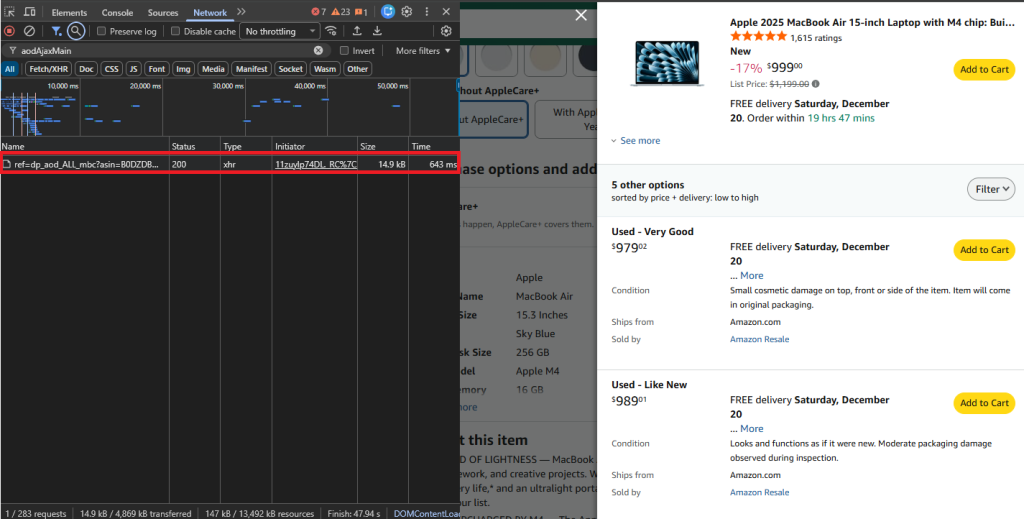
When you click “Other Sellers on Amazon” or the seller count link on a product page, Amazon loads seller data via an AJAX call.
Open your browser’s Network tab (F12 → Network), click on the sellers section, and you’ll see a request to:
https://www.amazon.com/gp/product/ajax/aodAjaxMain/?asin={ASIN}
This endpoint returns a semi-structured HTML response with all active offers for that product—much easier to parse than the full product page.
Build the Request
We’ll use WebParsers to fetch the seller offers page:
import requests
import urllib.parse
from bs4 import BeautifulSoup
import csv
import re

# Configuration
token = "<your-token>"
asin = "B0DZDBWM5B"  # MacBook Air M4 as example

# Build API URL
target_url = f"https://www.amazon.com/gp/product/ajax/aodAjaxMain/?asin={asin}"
api_url = f"https://api.webparsers.com/?token={token}&url={urllib.parse.quote(target_url, safe='')}&geoCode=us"

# Fetch and parse
soup = BeautifulSoup(requests.get(api_url).text, "html.parser")
Helper Functions
Before parsing, we’ll create two helper functions to keep our extraction code clean:
def get_text(elem, default="N/A"):
    return " ".join(elem.get_text().split()) if elem else default

def find_match(pattern, text, default="N/A"):
    match = re.search(pattern, text) if text else None
    return match.group(1) if match else default
Parse Seller Offers
Each seller offer lives in a container with the aod-offer-soldBy div. We’ll loop through all of them and extract the relevant information:
offers = []
for sold_by in soup.find_all("div", id="aod-offer-soldBy"):
    # Find parent container with price
    container = sold_by.parent
    while container and not container.find("span", class_="a-price-whole"):
        container = container.parent
    if not container:
        continue

    # Extract price
    whole = container.find("span", class_="a-price-whole")
    frac = container.find("span", class_="a-price-fraction")
    price = f"${whole.text.strip('.')}.{frac.text.strip()}" if whole else "N/A"

    # Get seller name
    seller_link = sold_by.find("a", href=lambda x: x and "/gp/aag/main" in x)
    seller = seller_link.text.strip() if seller_link else "Amazon.com"

    # Extract seller reputation data
    rating_div = sold_by.find("div", id="aod-offer-seller-rating")
    rating_text = get_text(rating_div.find("span", class_="a-icon-alt")) if rating_div else ""
    count_text = get_text(rating_div.find("span", id=lambda x: x and "seller-rating-count" in str(x))) if rating_div else ""

    seller_rating = find_match(r"(\d+\.?\d*) out of 5", rating_text)
    rating_count = find_match(r"\((\d[\d,]*)\s*ratings\)", count_text)
    positive_pct = find_match(r"(\d+)%\s*positive", count_text)
    if positive_pct != "N/A":
        positive_pct += "%"

    # Get fulfillment details
    ships_div = container.find("div", id="aod-offer-shipsFrom")
    ships_from = get_text(ships_div.find("span", class_="a-color-base")) if ships_div else "N/A"
    condition = get_text(container.find("div", id="aod-offer-heading"), "New")

    offers.append({
        "ASIN": asin, "Price": price, "Condition": condition, "Seller": seller,
        "Seller Rating": seller_rating, "Rating Count": rating_count,
        "Positive": positive_pct, "Ships From": ships_from
    })

print(f"Found {len(offers)} seller offers for ASIN: {asin}")
Export to CSV
Finally, add the export logic to save all results to a CSV:
with open("amazon_seller_offers.csv", "w", newline="", encoding="utf-8") as f:
    writer = csv.DictWriter(f, fieldnames=list(offers[0].keys()) if offers else [])
    writer.writeheader()
    writer.writerows(offers)

print("Data exported to amazon_seller_offers.csv")
Running this on a MacBook Air listing returns sellers like Amazon, Adorama, and third-party resellers—each with their price, condition, rating, and fulfillment details:
Found 7 seller offers for ASIN: B0DZDBWM5B
Data exported to amazon_seller_offers.csv
Or The Easy Way
Want structured JSON instead of parsing HTML? The WebParsers Amazon Scraper API has an offer-listing endpoint that returns all seller offers in a clean format:
import requests

token = "<your-token>"
asin = "B0DZDBWM5B"

response = requests.get(
    "https://api.webparsers.com/plugin/amazon/offer-listing",
    params={
        "token": token,
        "asin": asin,
        "geocode": "us",
        "zipcode": "10001"
    }
)

data = response.json()
print(data)
Sample response:
{
  "asin": "B0DZDBWM5B",
  "offers": [
    {
      "condition": "New",
      "merchantName": "Amazon.com",
      "listingPrice": {"amount": 999.00, "currency": "USD"},
      "shipsFrom": "Amazon.com",
      "isFulfilledByAmazon": true,
      "isBuyBoxWinner": true,
      "primeInformation": {"isPrime": true}
    },
    {
      "condition": "New",
      "merchantName": "Adorama",
      "listingPrice": {"amount": 1154.85, "currency": "USD"},
      "shipsFrom": "Adorama",
      "isFulfilledByAmazon": false,
      "isBuyBoxWinner": false
    }
  ],
  "status": "success"
}
Every seller offer with pricing, condition, fulfillment details, and Buy Box status—no parsing needed.
Frequently Asked Questions
Can you scrape Amazon for prices?
Answering this question from two different angles: yes, it is legal to scrape product prices on Amazon because they’re public data, and yes, even a beginner developer can easily scrape them following this guide using Python.
How do you retrieve data from Amazon?
You can easily retrieve data from Amazon in 3 steps:
- Use a web scraping API or a stealth plugin to bypass Amazon’s firewall
- Write code in your preferred programming language that retrieves HTML responses and parses the data you want
- Input your target URLs and automate the process using workflows
Is Amazon easy to scrape?
Amazon is not easy to scrape at all. If you’re trying to scrape without an existing scraping operation to handle anti-bot restrictions and proxies, you’ll instantly get blocked. If you use a scraping API that is known to handle Amazon’s WAF, however, it can become quite simple to extract data from Amazon.
Does Amazon have anti-scraping?
Yes, Amazon uses AWS WAF as its firewall to block all bots including scrapers. It analyzes your IP, headers, and activity to make sure you’re a regular human browsing the website; and if you’re not, you’re blocked instantly.
Summary
In this comprehensive guide, we’ve covered everything you need to know about scraping Amazon product data. We started with the basics of scraping simple product pages, then moved on to handling complex products with multiple variations, and finally explored how to extract seller offer data.
By using WebParsers to handle the anti-bot bypass, proxy rotation, and CAPTCHA solving, you can focus on what matters most: extracting and analyzing the data you need. Whether you’re building a price monitoring tool, conducting market research, or developing an e-commerce application, the techniques in this guide will help you gather Amazon data at scale.
Remember to always scrape responsibly, respect rate limits, and stick to publicly available data. Happy scraping!