
In this web scraping tutorial, we’ll explore how to scrape Zoopla – a leading UK real estate property marketplace.
We’ll be extracting real estate data including pricing information, addresses, photos and contact details from Zoopla’s property listings.
For scraping Zoopla properties, we’ll utilize hidden web data extraction techniques since this platform runs on Next.js architecture. We’ll also examine how to discover real estate properties through Zoopla’s search functionality and sitemap structure to gather comprehensive property data.
Additionally, we’ll explore property monitoring by continuously scraping for newly listed properties – providing valuable insights for real estate market intelligence. We’ll be working with Python alongside several community libraries – Let’s get started!
Key Takeaways
Master scraping Zoopla.com UK real estate property data with Python through hidden web data methods, extracting property listings, pricing details, and market insights from Next.js powered pages.
- Apply hidden web data scraping to extract Zoopla’s Next.js embedded JSON data without requiring browser automation
- Process JavaScript-embedded data structures to access detailed UK property information and pricing data
- Navigate Zoopla’s anti-scraping protections using appropriate headers and request timing for real estate data extraction
- Extract organized property data including addresses, images, contact information, and listing details
- Deploy search and sitemap mechanisms to discover and monitor all accessible property listings
- Implement property monitoring for newly listed properties to achieve competitive insights in UK real estate markets
Why Scrape Zoopla.com?
Zoopla.com stands as one of the largest real estate platforms in the United States, representing the most extensive public real estate database available. It contains valuable fields such as property prices, listing locations, sale dates and comprehensive property details.
This information proves invaluable for market analysis, housing industry research, and competitive intelligence gathering.
For more detailed information on scraping applications, refer to our comprehensive guide on Scraping Use Cases
How to Scrape Real Estate Property Data using Python
Introduction to scraping real estate property data. What is it, why and how to scrape it? We’ll also list dozens of popular scraping targets and common challenges.
Available Zoopla Data Fields
We can extract data from Zoopla across several popular real estate categories and targets:
- Properties for sale
- Properties for rent
- Real estate agent information
In this guide, we’ll concentrate on scraping real estate property data (both rental and sale) for popular data fields such as:
- Prices
- Photos
- Agent contact details
- Property features
- Property metadata and performance
For additional details, see the example scraper dataset covering all fields we’ll be extracting in this guide:
Example Scraper Output
Project Setup
In this tutorial, we’ll be working with Python and three community packages:
- httpx – HTTP client library enabling communication with Zoopla.com’s servers
- parsel – HTML parsing library for parsing scraped HTML data using CSS selectors or Xpath
- jmespath – JSON parsing library allowing XPath-like rules for JSON data
These packages can be installed easily using the pip install command:
$ pip install httpx parsel jmespath
Alternatively, you can substitute httpx with any other HTTP client package like requests since we’ll only need basic HTTP functionality that’s nearly interchangeable across libraries. For parsel, beautifulsoup serves as an excellent alternative.
Scraping Zoopla Property Data
Let’s begin by examining how to scrape property data from an individual listing page.
We’ll start by selecting a random property listing as our test target. To extract its data, we’ll parse HTML documents using parsel.
import asyncio
import json
from typing import List

from httpx import AsyncClient, Response
from parsel import Selector

session = AsyncClient(
    headers={
        # use same headers as a popular web browser (Chrome on Windows in this case)
        "User-Agent": "Mozilla/5.0 (Macintosh; Intel Mac OS X 10_15_7) AppleWebKit/537.36 (KHTML, like Gecko) Chrome/91.0.4472.114 Safari/537.36",
        "Accept": "text/html,application/xhtml+xml,application/xml;q=0.9,image/avif,image/webp,image/apng,*/*;q=0.8,application/signed-exchange;v=b3;q=0.9",
        "Accept-Language": "en-US,en;q=0.9",
    }
)

def parse_property(response: Response) -> Optional[PropertyResult]:
    """refine property data using JMESPath"""
    selector = Selector(response.text)
    url = selector.xpath("//meta[@property='og:url']/@content").get()
    price = selector.xpath("//p[contains(text(),'£')]/text()").get()
    receptions = selector.xpath("//p[contains(text(),'reception')]/text()").get()
    baths = selector.xpath("//p[contains(text(),'bath')]/text()").get()
    beds = selector.xpath("//p[contains(text(),'bed')]/text()").get()
    gmap_source = selector.xpath("(//section[@aria-labelledby='local-area']//picture/source/@srcset)[last()]").get()
    coordinates = gmap_source.split("/static/")[1].split("/")[0] if gmap_source else None
    agent_path = selector.xpath("//section[@aria-label='Contact agent']//a/@href").get()

    info = []
    for i in selector.xpath("//section[h2[@id='key-info']]/ul/li"):
        info.append(
            {
                "title": i.xpath(".//p/text()").get(),
                "value": i.xpath(".//div/p/text()").get(),
            }
        )

    nearby = []
    for i in selector.xpath("//div[section[contains(@aria-label,'Travel')]]/section[3]//li/div"):
        distance = i.xpath(".//p[2]/text()").get()
        nearby.append(
            {
                "title": i.xpath(".//p[1]/text()").get(),
                "distance": float(distance.split(" ")[0]) if distance else None,
                "unit": distance.split(" ")[1] if distance else None,
            }
        )

    result = {
        "id": int(url.split("details/")[-1].split("/")[0]) if url else None,
        "url": url,
        "title": selector.xpath("//title/text()").get(),
        "address": selector.xpath("//address/text()").get(),
        "price": {
            "amount": int(price.replace("£", "").replace(",", "")) if price else None,
            "currency": "£",
        },
        "gallery": selector.xpath("//li[contains(@data-key,'gallery')]/picture/source[last()]/@srcset").getall(),
        "epcRating": selector.xpath("//p[contains(text(),'EPC')]/text()").get(),
        "floorArea": selector.xpath("//p[contains(text(),'ft')]/text()").get(),
        "numOfReceptions": int(receptions.split(" ")[0]) if receptions else None,
        "numOfBathrooms": int(baths.split(" ")[0]) if baths else None,
        "numOfBedrooms": int(beds.split(" ")[0]) if beds else None,
        "propertyTags": selector.xpath("(//section/ul)[1]/li/p/text()").getall(),
        "propertyInfo": info,
        "propertyDescription": selector.xpath("//section[@aria-labelledby='about']/ul/li/p/span/text()").getall(),
        "coordinates": {
            "googleMapeSource": gmap_source,
            "latitude": float(coordinates.split(",")[0]) if coordinates else None,
            "longitude": float(coordinates.split(",")[1]) if coordinates else None,
        },
        "nearby": nearby,
        "agent": {
            "name": selector.xpath("//section[@aria-label='Contact agent']//p/text()").get(),
            "logo": selector.xpath("//section[@aria-label='Contact agent']//img/@src").get(),
            "url": "https://www.zoopla.co.uk" + agent_path if agent_path else None,
        }
    }

    return result


async def scrape_properties(urls: List[str]):
    to_scrape = [session.get(url) for url in urls]
    properties = []
    for response in asyncio.as_completed(to_scrape):
        properties.append(parse_property(await response))
    return properties
Above, we created a compact web scraper for Zoopla properties. Let’s examine the key components of our approach.
First, we establish an httpx session with browser-like default headers to prevent blocking. Then, we utilize the parsel.Selector object to parse HTML documents using XPath selectors and return results as JSON.
Here’s a sample output of our results.
Example Output
Here, we’ve enhanced our Python Zoopla web scraper with JSON parsing capabilities by defining parsing paths using JMESPath.
Finding Zoopla Properties
To locate property listings on Zoopla, we have two approaches: scrape sitemaps to discover all listed properties or utilize Zoopla’s search functionality to scrape listings by location.
Scraping Zoopla Search
Zoopla operates on a comprehensive search system enabling easy website navigation. Before scraping Zoopla’s search functionality, let’s examine its appearance. When submitting a search request with a keyword like “Islington, London”, you’ll encounter a similar page:
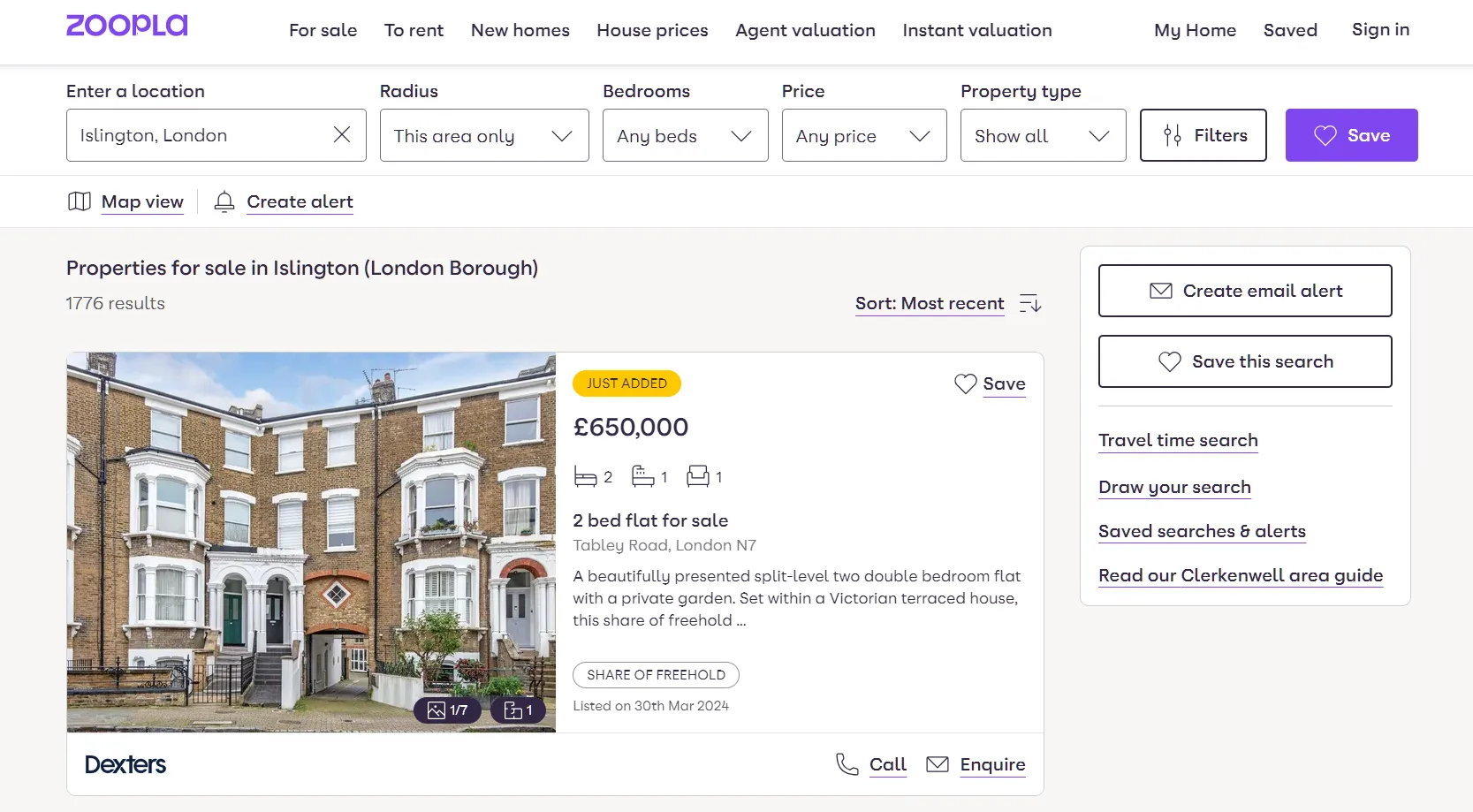
Zoopla search page
Zoopla search pages are dynamic, requiring JavaScript to load search results. This necessitates headless browsers like Selenium, Playwright, or Puppeteer. In this Zoopla scraper, we’ll use Webparsers to enable JavaScript rendering with a simple render_js parameter:
import json
import asyncio
import urllib.parse
from typing import List, Dict, Literal
from webparsers import ScrapeConfig, WebparsersClient, ScrapeApiResponse

Scraper = WebparsersClient(key="Your API key")

def parse_search(response: ScrapeApiResponse):
    """parse property data from Zoopla search pages"""
    selector = response.selector
    data = []
    total_results = int(
        json.loads(selector.xpath("//script[@id='__ZAD_TARGETING__']/text()").get())["search_results_count"]
    )
    boxes = selector.xpath("//div[@data-testid='regular-listings']/div")
    _results_count = len(boxes)
    total_pages = total_results // _results_count

    for box in boxes:
        url = box.xpath(".//a/@href").get()
        if not url:
            continue
        price = box.xpath(".//p[@data-testid='listing-price']/text()").get()
        sq_ft = box.xpath(".//span[contains(text(),'sq. ft')]/text()").get()
        sq_ft = int(sq_ft.split(" ")[0]) if sq_ft else None
        listed_on = box.xpath(".//li[contains(text(), 'Listed on')]/text()").get()
        listed_on = listed_on.split("on")[-1].strip() if listed_on else None
        bathrooms = box.xpath(".//span[(contains(text(), 'bath'))]/text()").get()
        bedrooms = box.xpath(".//span[(contains(text(), 'bed'))]/text()").get()
        livingrooms = box.xpath(".//span[(contains(text(), 'reception'))]/text()").get()
        image = box.xpath(".//picture/source/@srcset").get()
        agency = box.xpath(".//div[a[@data-testid='listing-card-content']]/div")
        item = {
            "price": int(price.split(" ")[0].replace("£", "").replace(",", "")) if price else None,
            "priceCurrency": "Sterling pound £",
            "url": "https://www.zoopla.co.uk" + url.split("?")[0] if url else None,
            "image": image.split(":p")[0] if image else None,
            "address": box.xpath(".//address/text()").get(),
            "squareFt": sq_ft,
            "numBathrooms": int(bathrooms.split(" ")[0]) if bathrooms else None,
            "numBedrooms": int(bedrooms.split(" ")[0]) if bedrooms else None,
            "numLivingRoom": int(livingrooms.split(" ")[0]) if livingrooms else None,
            "description": box.xpath(".//a[address]/p/text()").get(),
            "justAdded": bool(box.xpath(".//div[text()='Just added']/text()").get()),
            "agency": agency.xpath(".//img/@alt").get() or agency.xpath(".//p/text()").get(),
        }
        data.append(item)
    return {"search_data": data, "total_pages": total_pages}


async def scrape_search(
    scrape_all_pages: bool,
    location_slug: str,
    max_scrape_pages: int = 10,
    query_type: Literal["for-sale", "to-rent"] = "for-sale",
) -> List[Dict]:
    """scrape zoopla search pages for roperty listings"""
    # scrape the first search page first
    first_page = await Scraper.async_scrape(
        ScrapeConfig(
            url = f"https://www.zoopla.co.uk/{query_type}/property/{location_slug}",
            asp=True,
            country="GB",
            render_js=True,
            auto_scroll=True,
            rendering_wait=5000,
            wait_for_selector="//p[@data-testid='total-results']"
        )
    )
    data = parse_search(first_page)
    # extract property listings
    search_data = data["search_data"]
    # get the number of the available search pages
    max_search_pages = data["total_pages"]
    # scrape all available pages in the search if scrape_all_pages = True or max_search_pages > max_scrape_pages
    if scrape_all_pages == False and max_scrape_pages < max_search_pages:
        total_pages_to_scrape = max_scrape_pages
    else:
        total_pages_to_scrape = max_search_pages
    print(f"scraping search page {first_page.context['url']} remaining ({total_pages_to_scrape - 1} more pages)")
    # add the remaining search pages to a scraping list
    _other_pages = [
        ScrapeConfig(f"{first_page.context['url']}&pn={page}", asp=True, country="GB", render_js=True)
        for page in range(2, total_pages_to_scrape + 1)
    ]
    # scrape the remaining search page concurrently
    async for result in Scraper.concurrent_scrape(_other_pages):
        page_data = parse_search(result)["search_data"]
        search_data.extend(page_data)
    print(f"scraped {len(search_data)} search listings from {first_page.context['url']}")
    return search_data
In the above Zoopla scraping code, we define two functions. Let’s break them down:
- parse_search: Parses property data on Zoopla search pages and retrieves total available search pages. It iterates through search boxes to parse and refine each element using XPath selectors.
- scrape_search: Defines the search URL using search query parameters, including the search keyword. It requests the first page to retrieve available total pages and requests them concurrently.
Here’s a sample output from the above Zoopla scraper code:
Example output
The above code can be extended with crawling functionality. Instead of parsing search data results directly, the script can request dedicated property page URLs and extract complete property data.
Next, let’s examine a different discovery approach for finding all properties on Zoopla – the sitemaps.
Scraping Zoopla Sitemaps
Sitemaps are file collections containing URLs to various web pages – whether property listings, blog articles, or individual pages.
For our Python Zoopla scraper, to discover all properties using the sitemap collection, we must first locate the sitemap itself. We can check the /robots.txt endpoint which contains various instructions for web scrapers:
Sitemap: https://www.zoopla.co.uk/xmlsitemap/sitemap/index.xml.gz
This central sitemap serves as a hub for all other topic-categorized sitemaps:
<sitemap>
  <loc>https://www.zoopla.co.uk/xmlsitemap/sitemap/for_sale_details_001.xml.gz</loc>
  <lastmod>2022-12-08T09:25:08+00:00</lastmod>
</sitemap>
<sitemap>
  <loc>https://www.zoopla.co.uk/xmlsitemap/sitemap/to_rent_details_001.xml.gz</loc>
  <lastmod>2022-12-08T09:25:08+00:00</lastmod>
</sitemap>
<sitemap>
  <loc>https://www.zoopla.co.uk/xmlsitemap/sitemap/for_sale_flats_001.xml.gz</loc>
  <lastmod>2022-12-08T09:25:08+00:00</lastmod>
</sitemap>
...
Each sitemap is limited to 50,000 URLs – which explains why they’re divided into multiple parts.
For example, to scrape all rental properties, we could find all URLs by scraping the to_rent_ sitemaps.
Let’s examine how to scrape sitemap files using Python:
import gzip
import asyncio
from httpx import AsyncClient
from parsel import Selector

session = AsyncClient()

async def scrape_feed(url):
    response = await session.get(url)
    decoded_gzip = gzip.decompress(response.text.read()).decode('utf-8')
    selector = Selector(decoded_gzip)
    results = []
    for url in selector.xpath("//loc/text()").getall():
        results.append(url)
    return results

# example run
if __name__ == "__main__":
    results = asyncio.run(scrape_feed("https://www.zoopla.co.uk/xmlsitemap/sitemap/to_rent_details_001.xml.gz"))
    print(results)
Sometimes sitemap files can be gzip encoded. Use the gzip.decode() function to decode contents before passing them to the Selector.
Since sitemaps are XML files, we can parse them with the same tools used for HTML parsing. In the example above, we retrieve the sitemap page and extract URLs using parsel and XPath selectors.
Tracking New Zoopla Listings
Now that we know how to find property listings, we can also monitor Zoopla for new property listings by scraping either search results or sitemaps.
To keep our entire listing dataset current, we can monitor the new_home_details_x sitemaps found in the Zoopla sitemaps covered earlier.
However, these sitemaps are updated only once daily – what if we need immediate notification of new listings? For that, we can scrape search queries sorted by “Most Recent” which is precisely how we configured our search scraper.
Bypass Zoopla Blocking with Webparsers
Web scraping Zoopla is straightforward, however when scaling beyond a few property scrapes, we might encounter scraper blocking and captchas.
Webparsers provides web scraping, screenshot, and extraction APIs for large-scale data collection.
- Anti-bot protection bypass – scrape web pages without blocking!
- Rotating residential proxies – prevent IP address and geographic blocks.
- JavaScript rendering – scrape dynamic web pages through cloud browsers.
- Full browser automation – control browsers to scroll, input and click on objects.
- Format conversion – scrape as HTML, JSON, Text, or Markdown.
- Python and Typescript SDKs, as well as Scrapy and no-code tool integrations.
For this, we’ll use the webparsers-sdk python package and the Anti Scraping Protection Bypass feature. To start, let’s install webparsers-sdk using pip:
$ pip install webparsers-sdk
To leverage Webparsers’ API in our Zoopla web scraper, we simply need to replace our httpx session code with webparsers-sdk client requests:
import httpx

response = httpx.get("some redfin.com url")
# in webparsers SDK becomes
from webparsers import WebparsersClient, ScrapeConfig
client = WebparsersClient("YOUR API KEY")
result = client.scrape(ScrapeConfig(
    # some zoopla URL
    "https://www.zoopla.co.uk/for-sale/details/63412743/",
    # we can select specific proxy country
    country="GB",
    # and enable anti scraping protection bypass:
    asp=True,
))
For more information on scraping Zoopla.com using Webparsers, see the Full Scraper Code section.
FAQ
To wrap up this guide, let’s address some frequently asked questions about scraping data from Zoopla:
Is it legal to scrape Zoopla.com?
Yes. Zoopla’s data is publicly available – scraping Zoopla at moderate, respectful rates falls under ethical scraping practices.
That said, be mindful of GDPR compliance in the EU when storing personal data such as agents’ personal details like names and phone numbers. For more information, see our Is Web Scraping Legal? article.
Is there a Zoopla API?
Yes, though it’s private and limited to specific data fields (e.g., excludes agent contact details). Fortunately, as demonstrated in this article, we can scrape Zoopla using Python.
How to crawl Zoopla.com?
To web crawl Zoopla, we can adapt the scraping techniques covered in this article. Particularly, the recommended/similar properties data field can develop crawling logic. However, with Zoopla’s extensive sitemap system, crawling becomes unnecessary since we can scrape all properties directly.
Zoopla Scraping Summary
In this guide, we built a Zoopla scraper for real estate property data using Python with a few community packages: httpx, parsel and jmespath.
Legal Disclaimer and Precautions
This tutorial covers popular web scraping techniques for educational purposes. Interacting with public servers requires diligence and respect, and here’s a good summary of what not to do:
- Do not scrape at rates that could damage the website.
- Do not scrape data that’s not publicly available.
- Do not store PII of EU citizens who are protected by GDPR.
- Do not repurpose entire public datasets which can be illegal in some countries.
Webparsers does not offer legal advice, but these are good general rules to follow in web scraping, and for more guidance, you should consult a lawyer.
To scrape property data, we used parsel to extract data hidden in HTML script elements. We then cleaned and parsed the most important fields using JMESPath parsing language.
To find properties to scrape, we also explored how to scrape Zoopla’s sitemap and search systems. We’ve also covered how search scraping can be used to track when new properties are being listed.
Finally, to avoid blocking, we used Webparsers’ API which intelligently configures every web scraper connection to prevent blocking. For more about Webparsers, see our documentation and try it out for FREE!