
In this web scraping tutorial, we’ll examine how to scrape Redfin.com – a leading real estate listing platform. We’ll extract real estate information such as pricing details, property addresses and photos from Redfin property pages.
Our approach will utilize the hidden API scraping technique for collecting Redfin properties. We’ll also explore property monitoring by continuously scraping for recently listed or modified properties – providing a competitive advantage in real estate acquisition. We’ll leverage Python alongside several community libraries – Let’s get started!
Key Takeaways
Master scraping Redfin.com real estate property data with Python using hidden redfin api approaches, collecting pricing, addresses, and property information for market research.
- Access Redfin’s hidden API endpoints to retrieve property listings and pricing data without JavaScript rendering
- Parse JSON responses to extract comprehensive real estate information including prices, addresses, and photos
- Handle Redfin’s anti-scraping measures with proper headers and request spacing for real estate data collection
- Extract structured property data including listing details, sale history, and market performance metrics
- Implement property tracking systems for newly listed or updated properties to gain competitive advantages
- Use specialized tools like Webparsers for automated Redfin scraping with anti-blocking features
Web Scraping with Python
Introduction tutorial to web scraping with Python. How to collect and parse public data. Challenges, best practices and an example project.
Latest Redfin.com Scraper Code
Why Scrape Redfin.com?
Redfin.com represents one of the largest real estate platforms in the United States, making it an extensive public real estate data repository. It contains valuable fields including real estate prices, listing locations, sale dates and comprehensive property details.
This information proves invaluable for market analytics, housing industry research, and competitive analysis. Through web scraping Redfin, we can efficiently access a substantial real estate dataset.
See our Scraping Use Cases guide for more.
How to Scrape Real Estate Property Data using Python
Introduction to scraping real estate property data. What is it, why and how to scrape it? We’ll also list dozens of popular scraping targets and common challenges.
Available Redfind Data Fields
We can extract several popular real estate data fields and targets from Redfin:
- Property search pages
- Properties for sale
- Properties for rent
- Land for sale
- Open house events
- Real estate agent info
This guide focuses on scraping real estate property rent, sale and search pages, though the techniques can be easily adapted to other page types.
Project Setup
For this tutorial, we’ll utilize Python with several community packages:
- httpx – HTTP client library for communicating with Redfin.com’s servers
- parsel – HTML parsing library for processing scraped HTML files
- ScrapFly-SDK – Python SDK for ScrapFly. Enables web scraping at scale without blocking issues
Install these packages easily using pip:
$ pip install httpx parsel scrapfly-sdk
Feel free to substitute httpx with any other HTTP client package like requests since we only require basic HTTP functions that are largely interchangeable. Similarly, beautifulsoup serves as an excellent alternative to parsel.
How to Scrape Redfin Property Pages
Let’s start by examining how to extract property data from individual listing pages. Redfin property pages vary depending on whether properties are for sale or rent. We’ll begin with scraping rental property pages on redfin.com.
Scraping Redfin Property Pages for Rent
Rental property data on redfin.com originates from a private API. To observe this API in operation, follow these steps:
- Navigate to any rental property page like this property page on redfin.com
- Open browser developer tools using the F12 key and navigate to the Network tab
- Filter requests by Fetch/XHR requests
- Reload the page
Following these steps reveals all requests transmitted from browser to server during page reload:
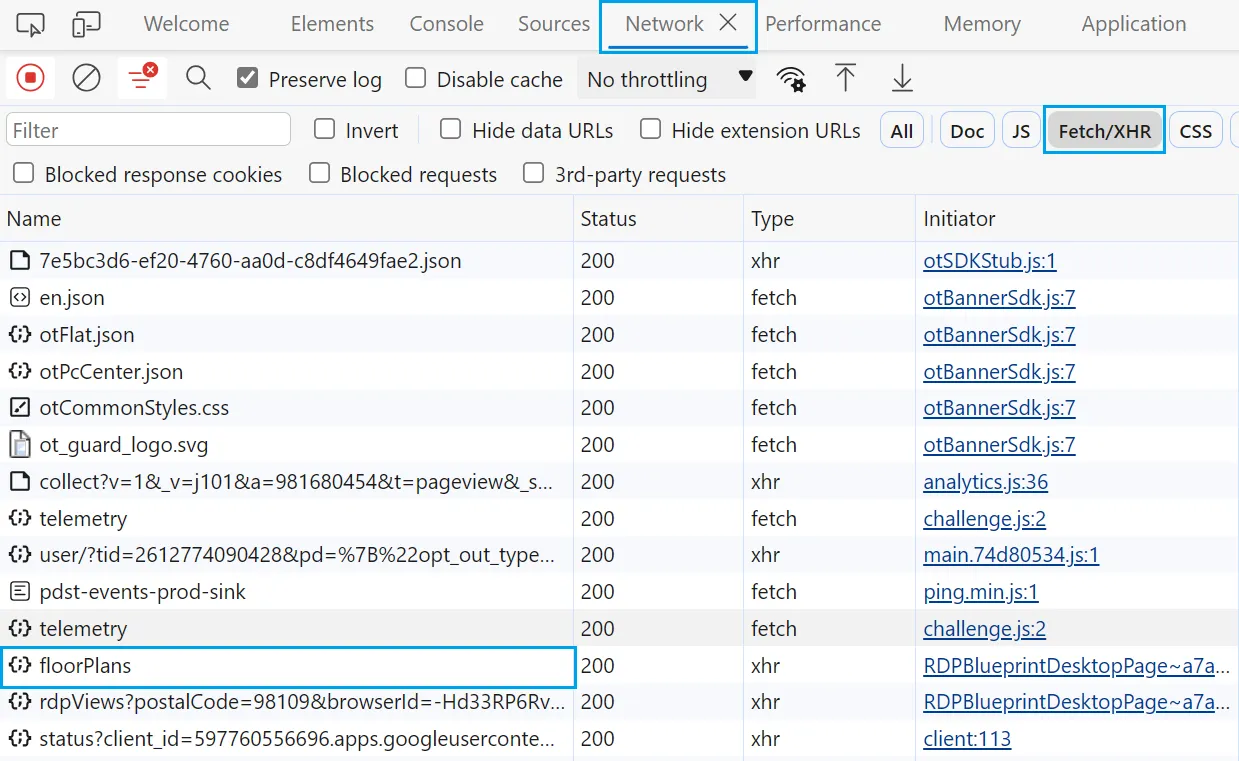
Background requests on developer tools
Multiple requests appear, but we’re specifically interested in the floorPlans request, which contains the actual property data:
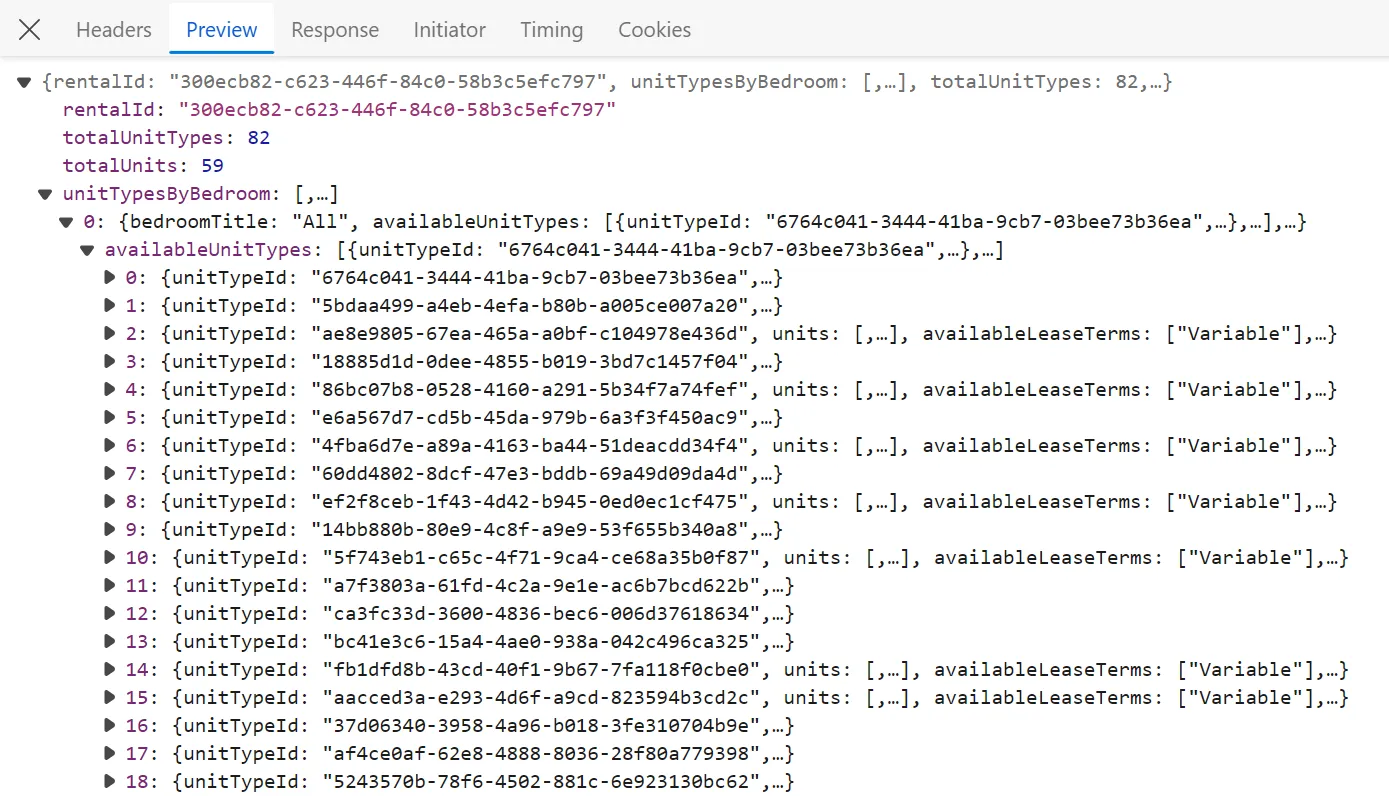
Property data API response
This request targets the following API URL:
https://www.redfin.com/stingray/api/v1/rentals/300ecb82-c623-446f-84c0-58b3c5efc797/floorPlans
The ID following the /rentals route represents the property’s rentalId. To scrape this data within our scraper, we’ll replicate this API request by extracting the rentalId from page HTML and then requesting the API:
import asyncio
import json
from typing import List, Dict
from httpx import AsyncClient, Response
from parsel import Selector

# 1. establish HTTP client with browser-like headers to avoid being blocked
client = AsyncClient(
    headers={
        "User-Agent": "Mozilla/5.0 (Windows NT 10.0; Win64; x64) AppleWebKit/537.36 (KHTML, like Gecko) Chrome/62.0.3202.94 Safari/537.36",
        "Accept": "text/html,application/xhtml+xml,application/xml;q=0.9,image/webp,image/apng,*/*;q=0.8",
        "Accept-Encoding": "gzip, deflate, br",
        "Accept-Language": "en-US,en;q=0.9,lt;q=0.8,et;q=0.7,de;q=0.6",
    },
    follow_redirects=True,
    http2=True,  # enable http2 to reduce block chance
    timeout=30,
)


def parse_property_for_rent(response: Response):
    """get the rental ID from the HTML to use it in the API"""
    selector = Selector(response.text)
    data = selector.xpath("//meta[@property='og:image']").attrib["content"]
    print(data)
    try:
        rental_id = data.split("rent/")[1].split("/")[0]
        # validate the rentalId
        assert len(rental_id) == 36
        return rental_id
    except:
        print("proeprty isn't for rent")
        return None


async def scrape_property_for_rent(urls: List[str]) -> list[Dict]:
    """scrape properties for rent from the API"""
    api_urls = []
    properties = []
    for url in urls:
        response_html = await client.get(url)
        rental_id = parse_property_for_rent(response_html)
        if rental_id:
            api_urls.append(
                f"https://www.redfin.com/stingray/api/v1/rentals/{rental_id}/floorPlans"
            )
    # add the property pages API URLs to a scraping list
    to_scrape = [client.get(url) for url in api_urls]
    for response in asyncio.as_completed(to_scrape):
        response = await response
        properties.append(json.loads(response.text))
    print(f"scraped {len(properties)} property listings for rent")
    return properties
If you encounter errors running the Python code tabs, this indicates blocking issues. Use the ScrapFly code tabs instead to avoid redfin.com scraping blocking.
Initially, we request the property page URL to extract the rentalId from HTML. Then, we use this ID to construct the API URL for each property page. Finally, we send requests to the defined API URLs to retrieve each property’s data in JSON format.
Here’s a sample output from our results:
Sample output
Now that we can scrape rental property pages, let’s move to properties for sale.
Scraping Redfin Property Pages for Sale
Unlike rental property pages, sale property pages don’t utilize an API for data retrieval. Therefore, we’ll scrape them using XPath and CSS selectors.
def parse_property_for_sale(response: Response) -> List[Dict]:
    """parse property data from the HTML"""
    selector = Selector(response.text)
    price = selector.xpath("//div[@data-rf-test-id='abp-price']/div/text()").get()
    estimated_monthly_price = "".join(selector.xpath("//span[@class='est-monthly-payment']/text()").getall())
    address = (
        "".join(selector.xpath("//div[contains(@class, 'street-address')]/text()").getall())
        + " " + "".join(selector.xpath("//div[contains(@class, 'cityStateZip')]/text()").getall())
    )
    description = selector.xpath("//div[@id='marketing-remarks-scroll']/p/span/text()").get()
    images = [
        image.attrib["src"]
        for image in selector.xpath("//img[contains(@class, 'widenPhoto')]")
    ]
    details = [
        "".join(text_content.getall())
        for text_content in selector.css("div .keyDetails-value::text")
    ]
    features_data = {}
    for feature_block in selector.css(".amenity-group ul div.title"):
        label = feature_block.css("::text").get()
        features = feature_block.xpath("following-sibling::li/span")
        features_data[label] = [
            "".join(feat.xpath(".//text()").getall()).strip() for feat in features
        ]
    return {
        "address": address,
        "description": description,
        "price": price,
        "estimatedMonthlyPrice": estimated_monthly_price,
        "propertyUrl": str(response.context["url"]),
        "attachments": images,
        "details": details,
        "features": features_data,
    }
Here, we define a parse_property_for_sale function that extracts property page data from HTML using XPath and CSS selectors, returning data as a JSON object. Next, we’ll combine this function with httpx to scrape property pages:
import asyncio
import json
from typing import List, Dict
from httpx import AsyncClient, Response
from parsel import Selector

# 1. establish HTTP client with browser-like headers to avoid being blocked
client = AsyncClient(
    headers={
        "User-Agent": "Mozilla/5.0 (Windows NT 10.0; Win64; x64) AppleWebKit/537.36 (KHTML, like Gecko) Chrome/62.0.3202.94 Safari/537.36",
        "Accept": "text/html,application/xhtml+xml,application/xml;q=0.9,image/webp,image/apng,*/*;q=0.8",
        "Accept-Encoding": "gzip, deflate, br",
        "Accept-Language": "en-US,en;q=0.9,lt;q=0.8,et;q=0.7,de;q=0.6",
    },
    follow_redirects=True,
    http2=True,  # enable http2 to reduce block chance
    timeout=30,
)

def parse_property_for_sale(response: Response) -> List[Dict]:
    """parse property data from the HTML"""
    # Rest of the function logic


async def scrape_property_for_sale(urls: List[str]) -> list[Dict]:
    """scrape properties for sale data from HTML"""
    properties = []
    # add the property pages API URLs to a scraping list
    to_scrape = [client.get(url) for url in urls]
    for response in asyncio.as_completed(to_scrape):
        response = await response
        properties.append(parse_property_for_sale(response))
    print(f"scraped {len(properties)} property listings for sale")
    return properties
We add property page URLs to a scraping list and scrape them concurrently. Then, we extract property data using our previously defined parse_property_for_sale function.
The result is a list containing each property page’s data:
Sample output
Our redfin scraper can now handle property pages. Let’s move on to search pages.
How to Scrape Redfin Search Pages
To scrape redfin.com search pages, we’ll utilize the private search API to retrieve data directly in JSON format. To view this API, follow these steps:
- Navigate to any search page on redfin.com
- Open browser developer tools using F12 to view page HTML
- Use the draw feature to mark a search area on the map
Redfin search area
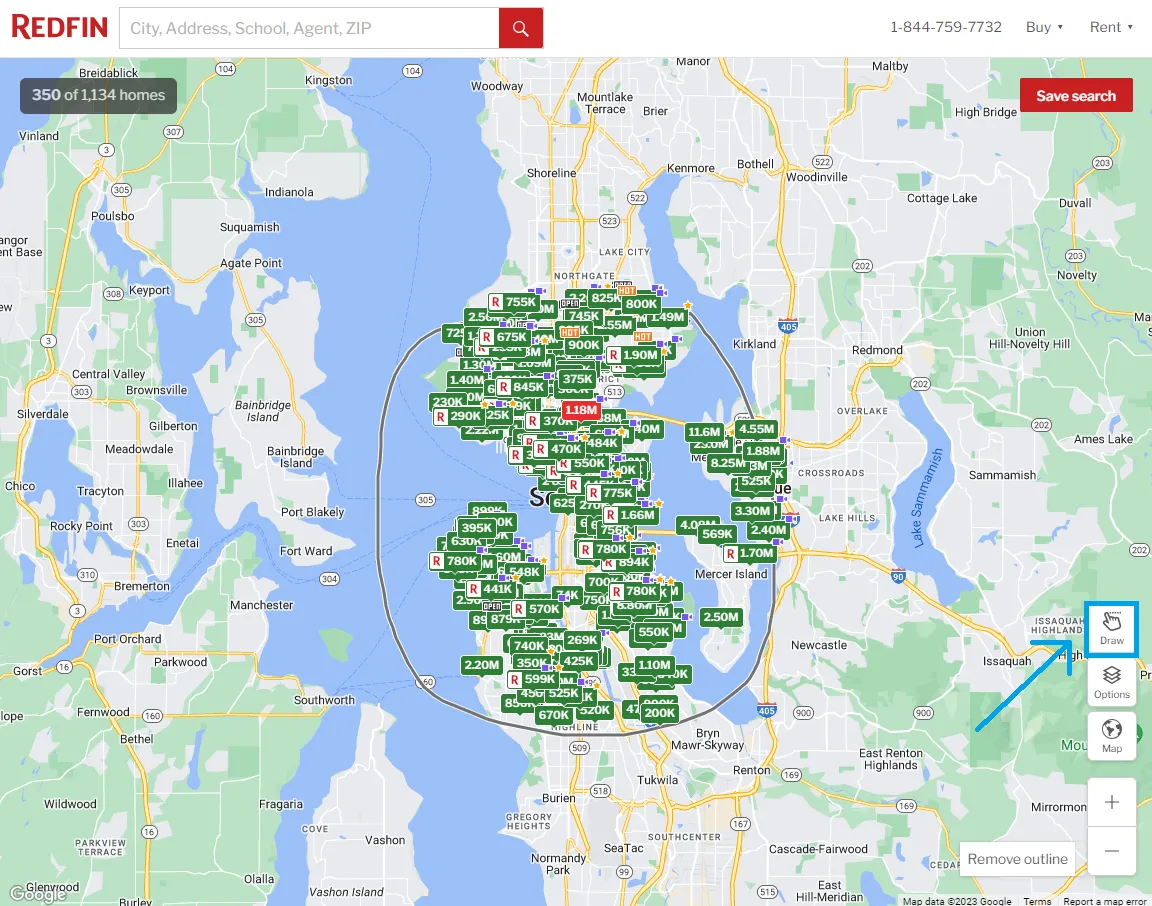
Following these steps, the browser records the API request used for fetching area data. To view this API, open the network tab and filter by Fetch/XHR requests:
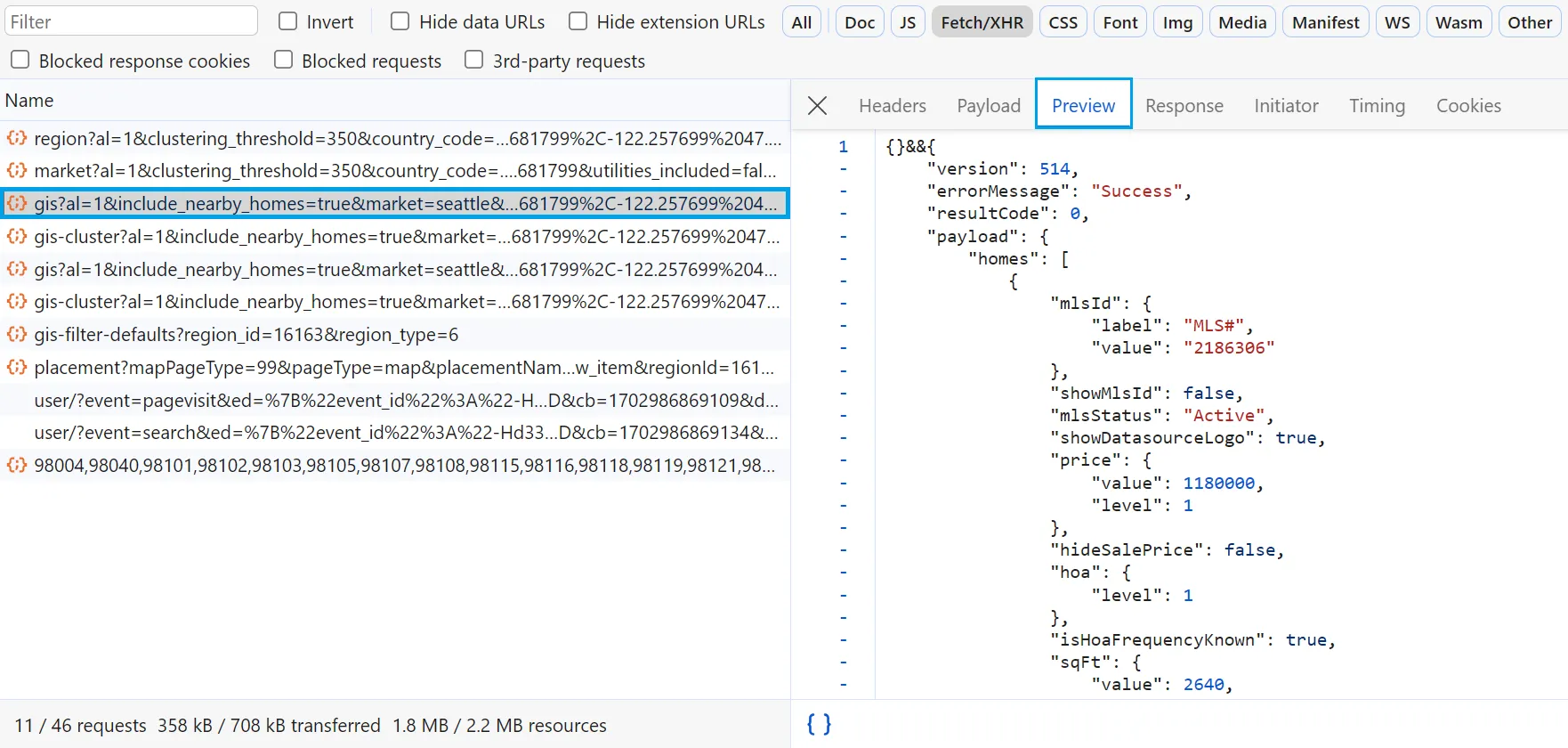
Redfin private search API
To scrape redfin.com search data, we’ll copy this API URL and use it to retrieve all search data in JSON:
import asyncio
import json
from typing import List, Dict
from httpx import AsyncClient, Response

# 1. establish HTTP client with browser-like headers to avoid being blocked
client = AsyncClient(
    headers={
        "User-Agent": "Mozilla/5.0 (Windows NT 10.0; Win64; x64) AppleWebKit/537.36 (KHTML, like Gecko) Chrome/62.0.3202.94 Safari/537.36",
        "Accept": "text/html,application/xhtml+xml,application/xml;q=0.9,image/webp,image/apng,*/*;q=0.8",
        "Accept-Encoding": "gzip, deflate, br",
        "Accept-Language": "en-US,en;q=0.9,lt;q=0.8,et;q=0.7,de;q=0.6",
    },
    follow_redirects=True,
    http2=True,  # enable http2 to reduce block chance
    timeout=30,
)


def parse_search_api(response: Response) -> List[Dict]:
    """parse JSON data from the search API"""
    return json.loads(response.text.replace("{}&&", ""))["payload"]["homes"]


async def scrape_search(url: str) -> List[Dict]:
    """scrape search data from the searh API"""
    # send a request to the search API
    search_api_response = await client.get(url)
    search_data = parse_search_api(search_api_response)
    print(f"scraped ({len(search_data)}) search results from the search API")
    return search_data
We use the scrape_search function to send requests to the search API and the parse_search_api function to load data into a JSON object.
Running this code retrieves all property data found across all search pagination pages:
Sample output
Excellent! We can scrape nearly all redfin.com data with just a few lines of code. But what about continuously monitoring redfin.com for recently added listings!
Following Redfin Listing Changes
To monitor new Redfin listings, we can utilize sitemap feeds for the newest and updated listings:
- newest – signals when new listings are posted
- latest – signals when listings are updated or modified
To identify new listings and updates, we’ll scrape these two sitemaps which provide listing URLs and timestamps indicating when they were listed or updated:
<url>
  <loc>https://www.redfin.com/NH/Boscawen/1-Sherman-Dr-03303/home/96531826</loc>
  <lastmod>2022-12-01T00:53:20.426-08:00</lastmod>
  <changefreq>daily</changefreq>
  <priority>1.0</priority>
</url>
Note that this sitemap uses UTC-8 timezone, indicated by the datetime string’s final number: -08.00.
To scrape these Redfin feeds in Python, we’ll use the httpx and parsel libraries we’ve used previously:
import asyncio
import arrow # for handling datetime: pip install arrow
from datetime import datetime
from parsel import Selector
from typing import Dict
from httpx import AsyncClient


client = AsyncClient(
    headers={
        "User-Agent": "Mozilla/5.0 (Windows NT 10.0; Win64; x64) AppleWebKit/537.36 (KHTML, like Gecko) Chrome/62.0.3202.94 Safari/537.36",
        "Accept": "text/html,application/xhtml+xml,application/xml;q=0.9,image/webp,image/apng,*/*;q=0.8",
        "Accept-Encoding": "gzip, deflate, br",
        "Accept-Language": "en-US,en;q=0.9,lt;q=0.8,et;q=0.7,de;q=0.6",
    }
)

async def scrape_feed(url) -> Dict[str, datetime]:
    """scrape Redfin sitemap and return url:datetime dictionary"""
    result = await client.get(url)
    selector = Selector(result.text)
    results = {}
    for item in selector.xpath("//url"):
        url = item.xpath(".//loc/text()").get()
        pub_date = item.xpath(".//lastmod/text()").get()
        results[url] = arrow.get(pub_date).datetime
    return results
Running this code provides URLs and dates of recently added property listings on redfin.com:
{
    'https://www.redfin.com/TN/Elizabethton/121-Williams-Ave-37643/home/116345480': datetime.datetime(2023, 11, 19, 18, 54, 56, 277000, tzinfo=tzoffset(None, -28800)),
    'https://www.redfin.com/IL/Bensenville/4N650-Ridgewood-Ave-60106/home/12559393': datetime.datetime(2023, 11, 19, 9, 26, 19, 968000, tzinfo=tzoffset(None, -28800)),
    'https://www.redfin.com/WI/Oak-Creek/10405-S-Willow-Creek-Dr-53154/home/57853736': datetime.datetime(2023, 11, 18, 14, 48, 58, 829000, tzinfo=tzoffset(None, -28800)),
    'https://www.redfin.com/FL/Davenport/511-Hatteras-Rd-33837/home/182909751': datetime.datetime(2023, 11, 19, 23, 52, 20, 650000, tzinfo=tzoffset(None, -28800)),
    'https://www.redfin.com/FL/Miramar/Undisclosed-address-33025/home/188607448': datetime.datetime(2023, 11, 18, 3, 59, 37, 511000, tzinfo=tzoffset(None, -28800))
}
We can then use our previously developed Python Redfin scraper to collect these URLs for property datasets.
Bypass Redfin Blocking with Webparsers
Scraping Redfin.com appears straightforward, however, when scraping at scale, our scrapers are likely to encounter blocking or captcha challenges. This is where Webparsers can assist!
scrapfly middleware
Webparsers provides web scraping, screenshot, and extraction APIs for data collection at scale.
- Anti-bot protection bypass – scrape web pages without blocking!
- Rotating residential proxies – prevent IP address and geographic blocks
- JavaScript rendering – scrape dynamic web pages through cloud browsers
- Full browser automation – control browsers to scroll, input and click on objects
- Format conversion – scrape as HTML, JSON, Text, or Markdown
- Python and Typescript SDKs, as well as Scrapy and no-code tool integrations
For example, we can utilize the scrapfly-sdk python package and the Anti Scraping Protection Bypass feature.
To leverage Webparsers’ API in our Redfin.com web scraper, we simply need to replace our httpx session code with scrapfly-sdk client requests:
import httpx
from parsel import Selector

response = httpx.get("some redfin.com url")
selector = Selector(response.text)

# in ScrapFly SDK becomes
from scrapfly import ScrapflyClient, ScrapeConfig
client = ScrapflyClient("Your ScrapFly API key")

result = client.scrape(ScrapeConfig(
    "some Redfin.com url",
    # we can select specific proxy country
    country="US",
    # and enable anti scraping protection bypass:
    asp=True
))
selector = result.selector
Try for FREE!
FAQ
To conclude this guide, let’s address some frequently asked questions about web scraping Redfin data:
Is it legal to scrape Redfin.com?
Yes. Redfin.com’s data is publicly available; we’re not collecting private information. Scraping Redfin at slow, respectful rates would fall under ethical scraping guidelines.
However, attention should be paid to GDPR compliance in the EU when storing personal data such as seller names, phone numbers etc. For more information, see our Is Web Scraping Legal? article.
Does Redfin.com have an API?
Currently, redfin.com doesn’t offer a public API. However, we’ve demonstrated that we can use redfin’s private APIs to obtain property listing data.
Redfin also publishes market summary datasets in their data-center section.
How to crawl Redfin.com?
Like scraping, we can also crawl redfin.com by following related rental pages listed on every property page. To write a Redfin crawler, see the related properties field in datasets scraped in this tutorial.
Are there alternatives to Redfin?
Yes, besides Redfin, Zillow and Realtor.com are major US real estate platforms. For UK real estate data, consider RightMove and Zoopla.
Redfin Scraping Summary
In this tutorial, we built a Redfin scraper in Python using several free community packages. We began by examining how to scrape property pages using redfin’s private API and HTML selectors. We also demonstrated how to scrape redfin.com search pages using the search API. Finally, we explained how to identify property listings and track new/updated properties through redfin’s sitemap system.
For this Redfin data scraper we used Python with httpx and parsel packages. To prevent blocking, we used Webparsers’ API, which intelligently configures every web scraper connection to avoid detection.
Legal Disclaimer and Precautions
This tutorial covers popular web scraping techniques for educational purposes. Interacting with public servers requires diligence and respect and here’s a good summary of what not to do:
- Do not scrape at rates that could damage the website
- Do not scrape data that’s not available publicly
- Do not store PII of EU citizens who are protected by GDPR
- Do not repurpose the entire public datasets which can be illegal in some countries
Webparsers does not offer legal advice but these are good general rules to follow in web scraping and for more you should consult a lawyer.