
SERP is a common industry term used in the SEO and brand awareness areas, representing each search result’s ranking. But what about scraping them from Google search pages?
Web scraping Google search can be difficult as Google uses a lot of obfuscation and anti-scraping technologies, requiring us to dive into several technical points like URL formatting, dynamic HTML parsing and avoiding scraping blocking.
In this article, we’ll explain how to scrape Google search results using Python. We’ll be looking at scraping with Python using traditional tools such as HTTP clients and HTML parsers, as well as Webparsers-SDK. Let’s dive in!
Key Takeaways
Master Google search scraping with Python using httpx and parsel, handling dynamic SERP content and bypassing anti-bot measures through proper request formatting.
- Reverse engineer Google’s search URL parameters to construct queries and navigate pagination
- Parse dynamic HTML using XPath selectors to extract search result data from SERPs
- Bypass Google’s JavaScript challenges and anti-scraping measures with proper headers
- Extract structured data including titles, URLs, snippets, and ranking information
- Implement exponential backoff retry logic with 403 status code detection for rate limiting
- Use Webparsers SDK for automated bypassing of Google’s bot detection systems
Why Scrape Google Search?
Google search represents one of the most comprehensive public databases available on the internet, serving as an excellent data source for numerous applications. Since Google indexes the majority of publicly accessible web pages, scraping Google search provides access to extensive data insights.
Another popular use case is SEO (Search Engine Optimization), where businesses can scrape Google search to understand competitor keyword strategies and rankings, enabling more effective market positioning. Complementing SERP data with website traffic analytics from SimilarWeb provides deeper competitive intelligence including visitor demographics, traffic sources, and engagement metrics.
Google search also features a snippets system that summarizes data from popular sources like IMDb, Wikipedia, etc. Google search scraping can be used to scrape these data directly from the search pages.
Project Setup
In this tutorial we’ll be scraping Google search using Python with a few popular community packages:
- httpx as our HTTP client which we’ll use to retrieve search results HTMLs.
- parsel as our HTML parser. Since Google uses a lot of dynamic HTML we’ll be using some clever XPath selectors to find the result data.
There are many popular alternatives to these two packages like beautifulsoup is a popular alternative to parsel, however since Google pages can be difficult to parse we’ll be using parsel’s XPath selectors which are much more powerful than CSS selectors used by beautifulsoup.
For the HTTP client we chose httpx as it’s capable of HTTP/2 which helps to avoid blocking. Though using other clients like requests or aiohttp is also possible.
Google is notorious for blocking web scraping so to follow along make sure to space out your requests to a few requests per minute to avoid being blocked. See the blocking section for more.
Alternatively, this blog also provides code using Webparsers SDK which solves many of the problems we’ll be discussing in this tutorial automatically.
How to Scrape Google Search Results
Let’s start Google search scraping by examining what occurs when we input the query “webparsers blog” in the Google search interface.
We can see that once we input the query we are taken to the search results URL that looks like google.com/search?hl=en&q=webparsers%20blog.
So, the search is using the /search endpoint and the query is being passed as a q parameter. The hl parameter is the language code and we can see that it’s set to en which means English.
This URL will get us the page but how do we parse it for the search results? For that, we’ll be using XPath selectors and since Google uses dynamic HTML we’ll follow the heading elements:
Simplified Google search page structure
While Google uses dynamic HTML we can still rely on relative structure for scraping. We can select <h3> elements and treat them as containers for each search result. Let’s try it out:
from collections import defaultdict
from urllib.parse import quote
from httpx import Client
from parsel import Selector

# 1. Create HTTP client with headers that look like a real web browser
client = Client(
    headers={
        "User-Agent": "Mozilla/5.0 (Windows NT 10.0; Win64; x64) AppleWebKit/537.36 (KHTML, like Gecko) Chrome/62.0.3202.94 Safari/537.36",
        "Accept": "text/html,application/xhtml+xml,application/xml;q=0.9,image/webp,image/apng,*/*;q=0.8",
        "Accept-Encoding": "gzip, deflate, br",
        "Accept-Language": "en-US,en;q=0.9,lt;q=0.8,et;q=0.7,de;q=0.6",
    },
    follow_redirects=True,
    http2=True,  # use HTTP/2
)


def parse_search_results(selector: Selector):
    """parse search results from google search page"""
    results = []
    for box in selector.xpath("//h1[contains(text(),'Search Results')]/following-sibling::div[1]/div"):
        title = box.xpath(".//h3/text()").get()
        url = box.xpath(".//h3/../@href").get()
        text = "".join(box.xpath(".//div[@data-sncf]//text()").getall())
        if not title or not url:
            continue
        url = url.split("://")[1].replace("www.", "")
        results.append(title, url, text)
    return results


def scrape_search(query: str, page=1):
    """scrape search results for a given keyword"""
    # retrieve the SERP
    url = f"https://www.google.com/search?hl=en&q={quote(query)}" + (f"&start={10*(page-1)}" if page > 1 else "")
    print(f"scraping {query=} {page=}")
    results = defaultdict(list)
    response = client.get(url)
    assert response.status_code == 200, f"failed status_code={response.status_code}"
    # parse SERP for search result data
    selector = Selector(response.text)
    results["search"].extend(parse_search_results(selector))
    return dict(results)

# example use: scrape 3 pages: 1,2,3
for page in [1, 2, 3]:
    results = scrape_search("Webparsers blog", page=page)
    for result in results["search"]:
        print(result)
Example Output
In the example above we wrote a short google search scraper. We first created a httpx client with headers that imitate a web browser to prevent being blocked by Google, then we defined two functions:
parse_search_results, which parses search results from a given SERP. Note that for parsing we use XPath selectors that use heading text matching instead of usual class or id matching. This is because Google uses dynamic HTML and we can’t rely on static class names.
scrape_search, which takes a query and page number and returns a list of search results. We can use this function to scrape google results of a given query. So, let’s take it for a spin and do some SEO analytics next!
How to Scrape Google SEO Rankings
Now that we can scrape SERP let’s take a look at how we can use this data in SEO practices.
How to Scrape Google SEO Keyword Data and Rankings
In this section, we’ll explore SEO web scraping techniques and how to leverage them for enhanced SEO keyword optimization. We’ll also build an SEO keyword scraper that extracts Google search rankings and suggested keywords.
To start, we can use this data to determine our position in search results for given queries or keywords. For example, let’s say we want to see how well our blog post about web scraping instagram is ranking for the keyword/query “scrape instagram”:
import re

def check_ranking(keyword: str, url_match: str, max_pages=3):
    """check ranking of a given url (partial) for a given keyword"""
    rank = 1
    for page in range(1, max_pages + 1):
        results = scrape_search(keyword, page=page)
        for (title, result_url, text) in results["search"]:
            if url_match in result_url:
                print(f"rank found:\n  {title}\n  {text}\n  {result_url}")
                return rank
            rank += 1
    return None

check_ranking(
    keyword="scraping instagram",
    url_match="Webparsers.com/blog/",
)
Above, we utilized our previously defined Google search scraper (the scrape_search function) to gather search result data from SERPs until we locate our blog post. In practice, we would execute this Google scraper periodically to monitor our search engine performance. We can also leverage this data to verify that search result titles and descriptions display as intended and modify our content accordingly.
How to Scrape Google Keyword Data
A significant aspect of SEO involves keyword research – understanding search patterns and optimizing content based on these queries.
When it comes to Google search scraping, the “People Also Ask” and “Related Searches” sections can be used in keyword research:
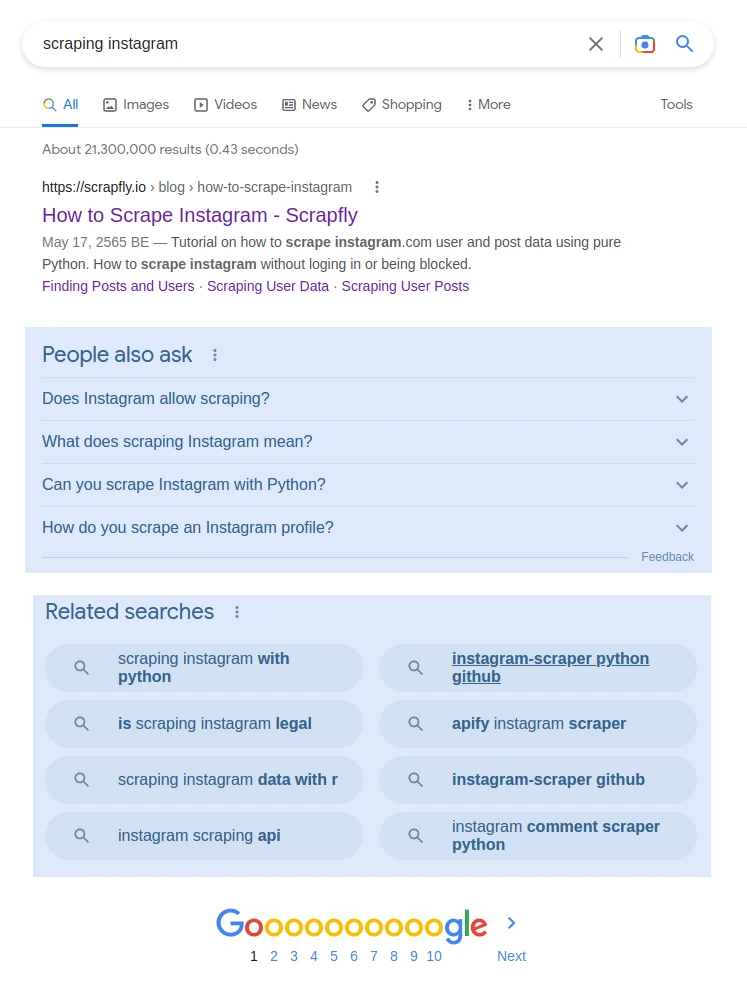
Let’s explore how we can scrape Google search to extract the above sections by continuing with our research for web scraping instagram article:
from collections import defaultdict
import json
from urllib.parse import quote
from httpx import Client
from parsel import Selector

# 1. Create HTTP client with headers that look like a real web browser
client = Client(
    headers={
        "User-Agent": "Mozilla/5.0 (Windows NT 10.0; Win64; x64) AppleWebKit/537.36 (KHTML, like Gecko) Chrome/62.0.3202.94 Safari/537.36",
        "Accept": "text/html,application/xhtml+xml,application/xml;q=0.9,image/webp,image/apng,*/*;q=0.8",
        "Accept-Encoding": "gzip, deflate, br",
        "Accept-Language": "en-US,en;q=0.9,lt;q=0.8,et;q=0.7,de;q=0.6",
    },
    follow_redirects=True,
    http2=True,
)


def parse_related_search(selector: Selector):
    """get related search keywords of current SERP"""
    results = []
    for suggestion in selector.xpath(
        "//div[div/div/span[contains(text(), 'search for')]]/following-sibling::div//a"
    ):
        results.append("".join(suggestion.xpath(".//text()").getall()))
    return results


def parse_people_also_ask(selector: Selector):
    """get people also ask questions of current SERP"""
    return selector.css(".related-question-pair span::text").getall()


def scrape_search(query: str, page=1):
    """scrape search results for a given keyword"""
    # retrieve the SERP
    url = f"https://www.google.com/search?hl=en&q={quote(query)}" + (f"&start={10*(page-1)}" if page > 1 else "")
    print(f"scraping {query=} {page=}")
    results = defaultdict(list)
    response = client.get(url)
    assert response.status_code == 200, f"failed status_code={response.status_code}"
    # parse SERP for search result data
    selector = Selector(response.text)
    results["related_search"].extend(parse_related_search(selector))
    results["people_also_ask"].extend(parse_people_also_ask(selector))
    return dict(results)


# Example use:
results = scrape_search("scraping instagram")
print(json.dumps(results, indent=2))
Example Output
Above, we defined two functions to parse related searches and related questions which we can use in SEO keyword research.
How to Scrape Google Rich Results
Google also offers rich results in the form of snippets. These are summaries of popular data sources like Wikipedia, IMDb, etc. For example, here is the Google snippet:
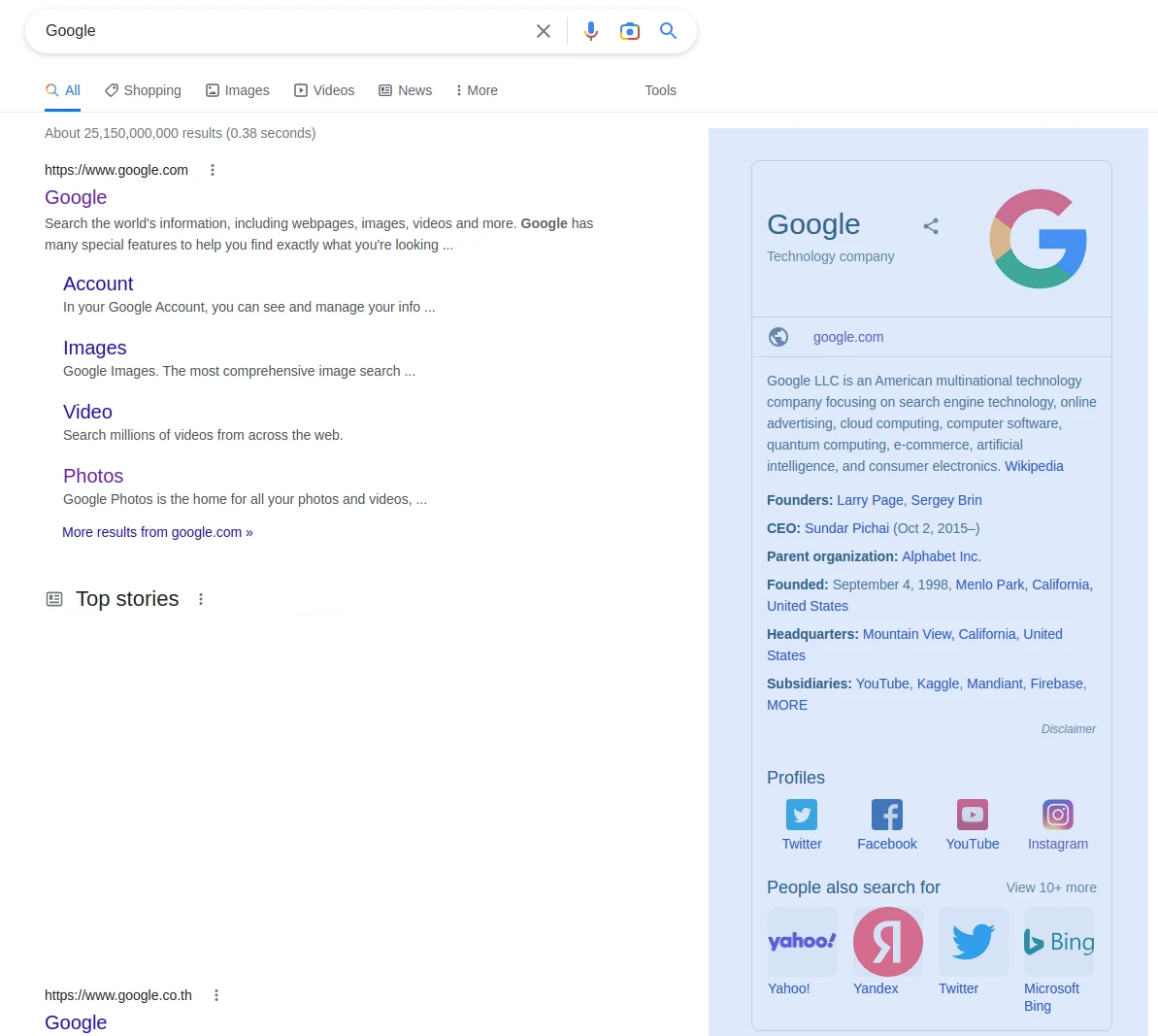
rich company overview results are available on the right
Snippets can aggregate data from multiple sources in a concise, predictable format so they’re popular web scraping targets as we can easily gather information about popular subjects like companies, public figures and bodies of work. Here is how we can web scrape Google snippets:
from parsel import Selector
from httpx import Client

client = Client(
    headers={
        "User-Agent": "Mozilla/5.0 (Windows NT 10.0; Win64; x64) AppleWebKit/537.36 (KHTML, like Gecko) Chrome/62.0.3202.94 Safari/537.36",
        "Accept": "text/html,application/xhtml+xml,application/xml;q=0.9,image/webp,image/apng,*/*;q=0.8",
        "Accept-Encoding": "gzip, deflate, br",
        "Accept-Language": "en-US,en;q=0.9,lt;q=0.8,et;q=0.7,de;q=0.6",
    },
    follow_redirects=True,
)


def parse_search_snippet(selector: Selector):
    snippet = selector.xpath("//h2[re:test(.,'complementary results','i')]/following-sibling::div[1]")
    data = {
        "title": snippet.xpath(".//*[@data-attrid='title']//text()").get(),
        "subtitle": snippet.xpath(".//*[@data-attrid='subtitle']//text()").get(),
        "website": snippet.xpath(".//a[@data-attrid='visit_official_site']/@href").get(),
        "description": snippet.xpath(".//div[@data-attrid='description']//span//text()").get(),
        "description_more_link": snippet.xpath(".//div[@data-attrid='description']//@href").get(),
    }
    # get summary info rows
    data["info"] = {}
    for row in snippet.xpath(".//div[@data-md]/div/div/div[span]"):
        label = row.xpath(".//span/text()").get()
        value = row.xpath(".//a/text()").get()
        data["info"][label] = value
    # get social media links
    data["socials"] = {}
    for profile in snippet.xpath(".//div[@data-attrid='kc:/common/topic:social media presence']//g-link/a"):
        label = profile.xpath(".//text()").get()
        url = profile.xpath(".//@href").get()
        data["socials"][label] = url
    return data


def scrape_search(query: str, page=1):
    """scrape search results for a given keyword"""
    url = f"https://www.google.com/search?hl=en&q={quote(query)}" + (f"&start={10*(page-1)}" if page > 1 else "")
    print(f"scraping {query=} {page=}")
    results = defaultdict(list)
    response = client.get(url)
    assert response.status_code == 200, f"failed status_code={response.status_code}"
    selector = Selector(response.text)
    results["search"].extend(parse_search_results(selector))
    results["rich_snippets"] = parse_search_snippet(selector)
    return dict(results)

# example:
print(scrape_search("google")["rich_snippets"])
Example Output
In this example, we collected details from the rich company overview snippet. For parsing this we relied on headings and data- attributes which can be reliably used to parse dynamic HTML documents. Note that rich snippets vary highly depending on subject and in our example we only cover one kind of rich snippet. However, most of the scraping logic can be reused for other details.
Google offers many different kinds of rich snippets and they can be scraped in a similar way.
Bypass Google Search Web Scraping Blocking
Our previous scripts can web scrape Google well. However, we have two problems:
- We have no way to specify search results for a specific country.
- If we scale them up Google will start blocking us.
Unfortunately, the only way to see results of a specific country is to use a proxy IP address or a web scraping API like Webparsers.
Webparsers acts a middleware between your scraper and your target automatically retrieving hard to reach content for you. It does this by employing millions of different proxies and smart request routing. So, we can solve both problems by using Webparsers.
Webparsers service does the heavy lifting for you!
To scrape Google search using webparsers, we’ll only have to replace our HTTP client with Webparsers-SDK:
from collections import defaultdict
from urllib.parse import quote
from parsel import Selector
from webparsers import ScrapeConfig, WebparsersClient

webparsers= WebparsersClient("YOUR WEBPARSERS KEY")


def parse_search_results(selector: Selector):
    """parse search results from google search page"""
    results = []
    for box in selector.xpath("//h1[contains(text(),'Search Results')]/following-sibling::div[1]/div"):
        title = box.xpath(".//h3/text()").get()
        url = box.xpath(".//h3/../@href").get()
        text = "".join(box.xpath(".//div[@data-content-feature=1]//text()").getall())
        if not title or not url:
            continue
        url = url.split("://")[1].replace("www.", "")
        results.append((title, url, text))
    return results


def scrape_search(query: str, page=1, country="US"):
    """scrape search results for a given keyword"""
    # retrieve the SERP
    url = f"https://www.google.com/search?hl=en&q={quote(query)}" + (f"&start={10*(page-1)}" if page > 1 else "")
    print(f"scraping {query=} {page=}")
    results = defaultdict(list)
    result = webparsers.scrape(ScrapeConfig(url, country=country, asp=True))
    # parse SERP for search result data
    results["search"].extend(parse_search_results(result.selector))
    return dict(results)

# Example use: scrape 3 pages: 1,2,3
for page in [1, 2, 3]:
    results = scrape_search("webparsers blog", page=page)
    for result in results["search"]:
        print(result)
By replacing httpx client with webparsers SDK, we don’t have to worry about Google search scraping blocking and get the results for a specific country.
FAQ
To wrap up this guide, let’s take a look at some frequently asked questions about web scraping Google search.
Is Google search scraping legal?
Yes, it is perfectly legal to scrape Google search results as it’s public, non-copyrighted data. However, attention should be paid to copyrighted images and videos which might be included in search results.
Is there a Google search API?
No, there is no official Google search API. However, scraping Google search is straightforward and you can use it to create your own web scraping API.
How to scrape Google Maps?
Google Maps is a separate service and can be scraped in a similar way as Google search results. For that see our tutorial on How to scrape google maps.
What are alternatives to scraping Google Search?
Bing is the second most popular search engine and a great alternative for SERP data collection. We have a detailed guide on scraping Bing Search with Python. Many other search engines like DuckDuckGo and Kagi use Bing’s data, so scraping Bing can provide coverage for these search engines as well.
How to Web Scrape Google Search – Summary
In this tutorial, we built a Google search web scraper using Python with several community packages. For retrieving the SERP content we used httpx which supports http2 and asynchronous connections and to parse the data we used parsel with XPath selectors to extract data from dynamic HTML pages.
The primary Google scraping challenges can be divided into two categories:
Parsing complex HTML pages.
For that, we used XPath selectors and focused on HTML structures like heading elements and CSS data- attributes which are less likely to change.
Blocking and Geo-Targeting.
For that, we used Webparsers which acts as a proxy and middleware between your scraper and the target website.