
Extracting accurate product data from Amazon can open the door to competitive pricing, product trend analysis, and smarter e-commerce strategies. But let’s be honest, scraping Amazon isn’t easy. From rotating proxies to bypassing anti-bot measures, it takes considerable effort to obtain clean, reliable data at scale.
That’s where Amazon Scraper APIs come in.
Instead of reinventing the wheel, developers and data teams now rely on specialized APIs that handle the heavy lifting, delivering structured Amazon data like product titles, prices, ASINs, reviews, availability, and more.
In this article, we’ll compare some of the best Amazon scraping APIs available today, covering their features, response quality, pricing, ease of use, and who they’re best suited for.
Whether you’re building a price tracker, dropshipping app, or market research tool, this guide will help you pick the right API for the job.
Criteria to Test Amazon Scraper APIs
We tested each product and compared them based on:
- Speed
- Success rate
- Support
- Scalability
- Developer friendliness
We used this Python code to test various APIs:
python
import requests
import time
import random

# List of (domain, ASIN) tuples
amazon_asin_code = [
    ('com', 'B0CVSJ8YBX'),
    ('com.br', 'B0DGXR6FRP'),
    ('in', 'B0CKN56PQ8'),
    ('ca', 'B0DWFSW47F')
]

base_url = "https://api.example.com/amazon/product"

API_key='your-api-key'
total_requests = 10
success_count = 0
total_time = 0

for i in range(total_requests):
    try:
        domain, asin = random.choice(amazon_asin_code)

        params = {
        "api_key": API_key,
        "domain":domain,
        "country":"us",
        "asin": asin
        }

        start_time = time.time()
        response = requests.get(base_url,params=params)
        end_time = time.time()

        request_time = end_time - start_time
        total_time += request_time

        if response.status_code == 200:
            success_count += 1

        print(f"Request {i+1}: domain={domain}, asin={asin}, time={request_time:.2f}s, status={response.status_code}")

    except Exception as e:
        print(f"Request {i+1} failed due to: {str(e)}")

# Final Stats
average_time = total_time / total_requests
success_rate = (success_count / total_requests) * 100

print(f"\n Total Requests: {total_requests}")
print(f" Successful: {success_count}")
print(f" Average Time: {average_time:.2f} seconds")
print(f" Success Rate: {success_rate:.2f}%")
By the end of this article, you’ll have a clear idea of which Amazon scraping API best fits your needs and budget.
Webparsers
Webparsers offers powerful Amazon Scraping APIs. With just a simple GET request, you can collect data from Amazon search and product pages.
Details
- Once you sign up, you get 1,000 free credits for testing.
- Per scrape cost starts from $0.001 and drops below $0.00025with higher volume.
- Webparsers APIs support targeted postal code-level scraping for any country, making it easy to retrieve local product pricing with precision.
- Webparsers provides clear documentation, and any developer can integrate the Amazon APIs easily into their working environment.
- Customer support is available 24/7 to help you resolve any query related to the services offered.
Testing Amazon Product Pages
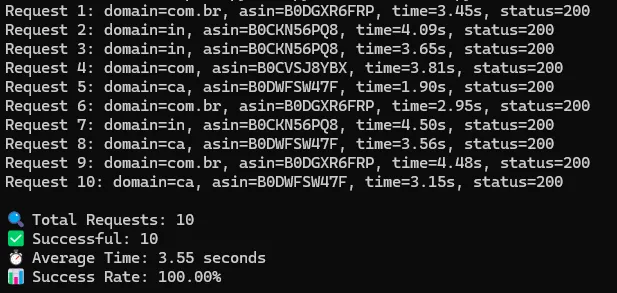
Test Summary: The average response time was around 3.55 seconds, and we got a 100% success rate.
ScraperAPI
ScraperAPI also provides a robust solution to scrape Amazon at scale.
Details
- ScraperAPI provides 5,000 free credits on signup.
- It costs around $0.00245 to scrape one Amazon page. The price falls below $0.000475 with high volume.
- ScraperAPI also provides price scraping on the basis of any given postal code. But they only support this feature for the USA.
- Documentation is very clear and can be easily integrated.
- Support is available through email only.
Testing Amazon Product Pages
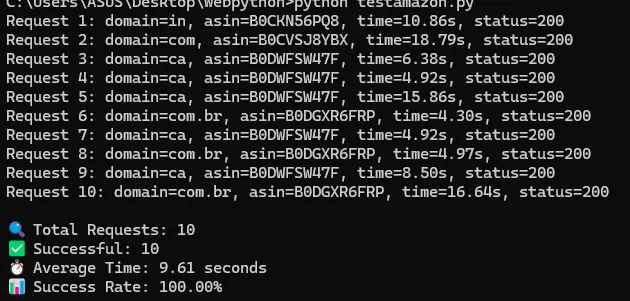
Test Summary: Average response time was 9.61 seconds with 100% success rate.
Bright Data
Bright Data, as you all know, is the pioneer in this industry. They also provide a dedicated solution for scraping Amazon at scale.
Details
- You can sign up and start testing this scraper after a basic KYC.
- The pricing per record is around $0.0009, and it remains fixed.
- The documentation may be a bit challenging to follow for beginners.
- Support is available 24/7 through email.
Test Summary
They use a webhook-based scraping method, which made real-time testing difficult. However, their dashboard claims an average response time of approximately 9 seconds.
Oxylabs
Oxylabs is another scraping solution that can help you scrape Amazon.
Details
- You can sign up and test the API for free.
- Oxylabs has a vast proxy pool through which it powers its scraping APIs.
- The pricing per request starts from $0.00135 and drops below $0.00125 with high volume.
- Documentation is clear.
- Support is available through email and chat, but their support is not as fast as others.
Testing Amazon Product Pages
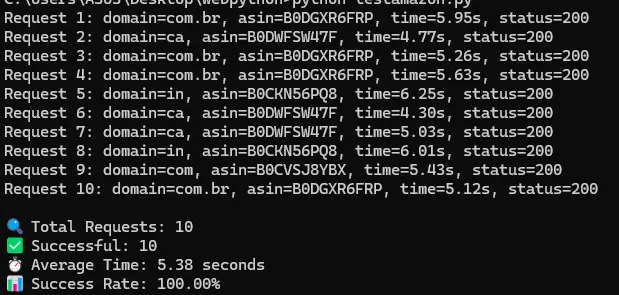
Test Summary: Response time was around 5.38 seconds with a success rate of 100%.
Speed Comparison
While all APIs deliver a 100% success rate, Webparsers stands out by being nearly 3x faster than Bright Data and ScraperAPI.
| API | Average Response Time |
|---|---|
| Webparsers | 3.55s |
| Oxylabs | 5.38s |
| Bright Data | ~9s |
| ScraperAPI | 9.61s |
Price Comparison
| API | Starting Price (per 1K) | High Volume Price (per 1K) |
|---|---|---|
| Webparsers | $1 | $0.063 |
| Bright Data | $0.90 | $0.90 (flat rate) |
| Oxylabs | $1.35 | $1.25 |
| ScraperAPI | $2.45 | $0.475 |
- Webparsers is the most cost-effective, starting at just $0.20 per 1K requests, and scaling down to $0.063 — ideal for high-volume use cases.
- ScraperAPI is the priciest at entry-level, starting at $2.45 per 1K, though bulk usage brings it down to $0.475.
- Bright Data keeps it simple with a flat rate of $0.90 per 1K, which is predictable but less flexible.
- Oxylabs offers modest discounts, reducing from $1.35 to $1.25 per 1K at higher usage tiers.
Conclusion
All APIs offer 100% success rate, but Webparsers stands out with the fastest average response time of 3.55 seconds, nearly 3x quicker than most competitors.
Webparsers is also the most cost-effective, starting at just $1 per 1K requests and dropping to $0.25/1K at scale.
ScraperAPI and Bright Data are significantly more expensive, especially for large-scale scraping, despite offering slower speeds.
Oxylabs sits in the middle ground, delivering decent speed and moderate pricing, but still lags behind Webparsers in both areas.
For developers or businesses looking to scrape Amazon efficiently, Webparsers offers the best balance of performance, reliability, and affordability.